Spring IoC


IoC (제어의 역행)


  • IoC(Inversion of Control)란, 프로그램을 구동하는데 필요한 객체에 대한 생성, 변경 등의 관리를 프로그램을 개발하는 사람이 아닌 프로그램을 구동하는 컨테이너에서 직접 관리하는 것을 말한다.
  • 스프링은 IoC 구조를 통해 구동 시 필요한 객체의 생성부터 생명 주기까지 해당 객체에 대한 관리를 직접 수행한다.


IoC 컨테이너


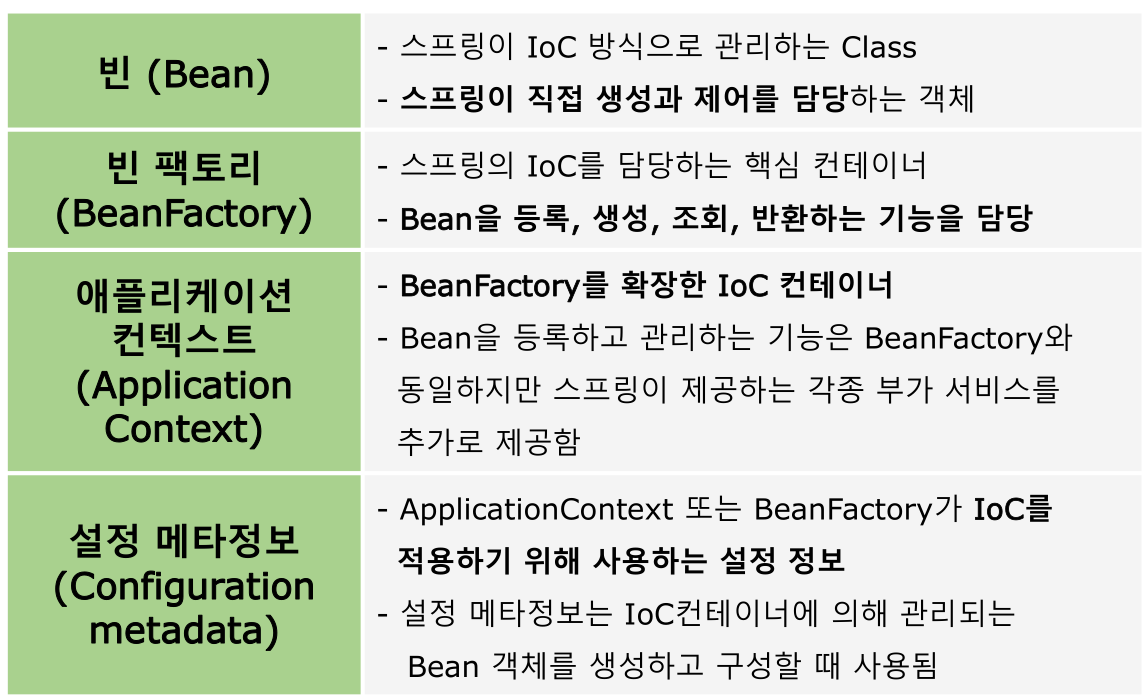
  • 스프링에서는 관리하는 객체를 'Bean(빈)'이라고 한다.
  • 해당 빈들을 관리한다는 의미로 컨테이너를 'Bean Factory'라고 한다.


▶ 위와 같이 나눠서 확장하는 이유 : 유지보수성을 위해 
별개의 인터페이스를 기능적으로 추가했을때 기존의 인터페이스는 영향받을 일이 없도록 함 최소한의 수정 가능


Spring IOC


IoC 컨테이너의 역할


  • 1. 객체의 생명주기와 의존성을 관리한다.
  • 2. VO(DTO/POJO) 객체의 생성, 초기화, 소멸 등의 처리를 담당한다.
  • 3. 개발자가 직접 객체를 생성할 수 있지만 해당 권한을 컨테이너에 맡김으로써 소스 코드 구현의 시간을 단축할 수 있다.


Plain Old Java Object
: 특정 설계 규약에 의해서 만들어 진것이 아닌 개발자가 필요에 의해 만든 클래스 (아무런 설계규약에 얽메이지 않음)


IoC 컨테이너와 Bean 객체


주요 컨테이너 종류


Spring DI


DI (의존성 주입)


  • DI(Dependency Injection)란 IoC 구현의 핵심 기술로, 사용하는 객체를 직접 생성하여 만드는 것이 아니라 컨테이너가 빈의 설정 정보를 읽어와 자동으로 해당 객체에 연결하는 것을 말한다.
  • 이렇게 의존성을 주입 받게 되면 이후 해당 객체를 수정해야 할 상황이 발생했을 때 소스 코드의 수정을 최소화 할 수 있다.


  • IoC는 제어의 역전이며 이 제어권이 개발자가 아닌 프레임 워크에 있다는 의미
  • 개발자는 사용하는 객체를 직접 생성하지 않고, 프레임워크가 맡겨진 객체들을 생성, 소멸 등의 관리를한다. 
  • 이 때, 컨테이너는 빈의 설정 정보를 읽어와서  자동으로 해당 객체에 연결되도록 하는 방법을 사용. B클래스의 객체를 생성시, B클래스에서 사용하는 A객체 역시 자동으로 생성시켜줌을 의미


DI의 장점


  • 1. 개발자가 작성해야 할 코드가 단순해진다.
  • 2. 각 객체 간의 종속 관계(결합도)를 해소할 수 있다.


객체간의 종속관계(결합도)


  • 한 클래스에서 필드 객체를 생성 할 때 발생하는 두 객체 간의 관계를 말하며, 각 객체간의 내용이 수정될 경우 영향을 미치는 정도를 나타낸다.
  • 예를 들어 A Class에서 B Class를 생성할 경우, 만약 B Class의 생성자의 매개변수가 변경되거나 제공하는 메소드가 변경될 경우 이를 사용하는 A Class의 일부 정보도 필히 수정해야 하는 상황이 발생하는데 이를 '두 객체간 종속관계(결합도)가 강하다' 라고 표현한다.


DI 의 종류


- Setter 메소드를 통한 의존성 주입

의존성을 주입받는 Setter 메소드를 만들고, 이를 통해 의존성을 주입


- 생성자를 통한 의존성 주입

필요한 의존성을 포함하는 클래스에 생성자를 만들고, 이를 통해 의존성을 주입


- 메소드를 통한 의존성 주입

의존성을 입력 받는 일반 메소드를 만들고 이를 통해 의존성을 주입


Setter 메소드를 통한 의존성 주입


Setter 메소드를 통해 의존관계가 있는 Bean을 주입하려면 <property> 태그를 사용한다.


XML 선언 방법


  • name 속성은 Class에서 선언한 필드 변수의 이름을 사용한다.
  • value 속성은 단순 값 또는 Bean이 아닌 객체를 주입할 때 사용한다.
  • ref 속성은 사용하면 Bean 이름을 이용해 주입할 Bean을 찾는다.


    <bean id="객체의 이름" class="클래스 풀네임">
        <property name="name" value="OOO" />
        <property name="name" ref="OOO" />
    </bean>


Setter 메소드를 통한 의존성 주입 예시


    <bean id="student"
        class="com.greedy.firstSpring.person.model.vo.Student">
            <property name="name" value="홍길동" />
            <property name="wallet" ref="money" />
    </bean>

    <bean id="money" class="com.greedy.firstSpring.wallet.model.vo.Wallet" />


생성자를 통한 의존성 주입


Constructor를 통해 의존관계가 있는 Bean을 주입하려면 <constructor-arg> 태그를 사용한다.


XML 선언 방법


  • Constructor 주입방식은 생성자의 파라미터를 이용하기 때문에 한번에 여러 개의 객체를 주입할 수 있다.
  • 필드 선언 순서에 따라 index 속성을 통해서도 접근이 가능하다.


    <bean id="불러 올 객체" class="클래스 풀네임">
        <constructor-arg index="0" value="OOO"/>
        <constructor-arg name="OOO" ref="OOO"/>
    </bean>


생성자를 통한 의존성 주입 예시


    <bean id="student"

    class="com.greedy.firstSpring.person.model.vo.Student">
        <constructor-arg index=“0” value=“홍길동”/>
        <constructor-arg index=“1” ref=“money”/>
    </bean>

    <bean id="money" class="com.greedy.firstSpring.wallet.model.vo.Wallet"/>


Spring DI 실습


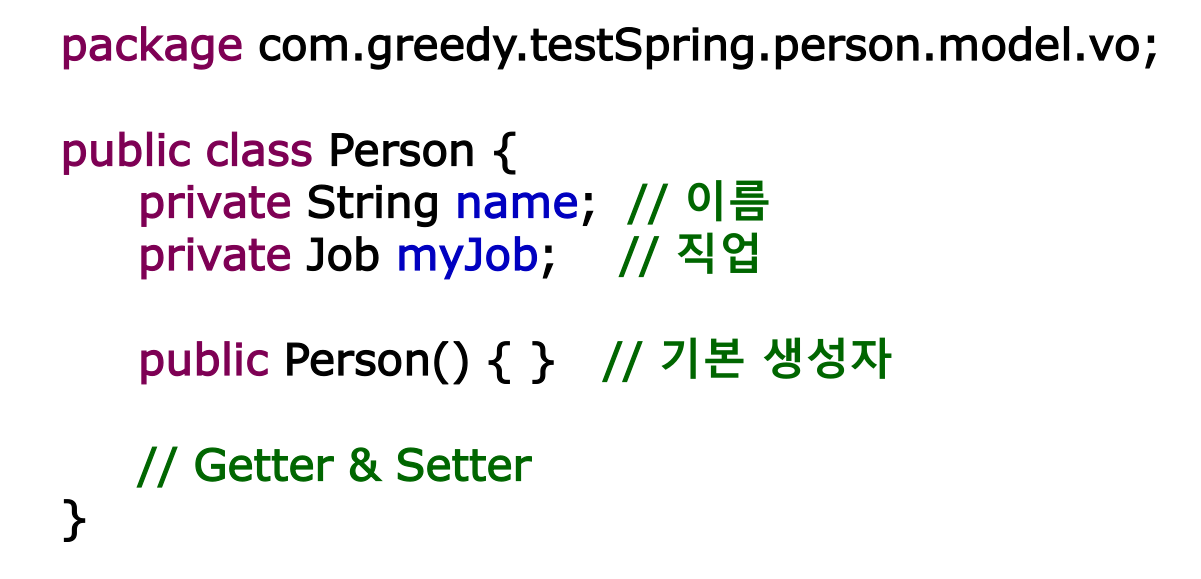
Person Class


Spring DI 실습을 위한 Person VO 객체를 만든다.


Job Interface


Spring DI 실습을 위한 Job Interface 를 만든다.


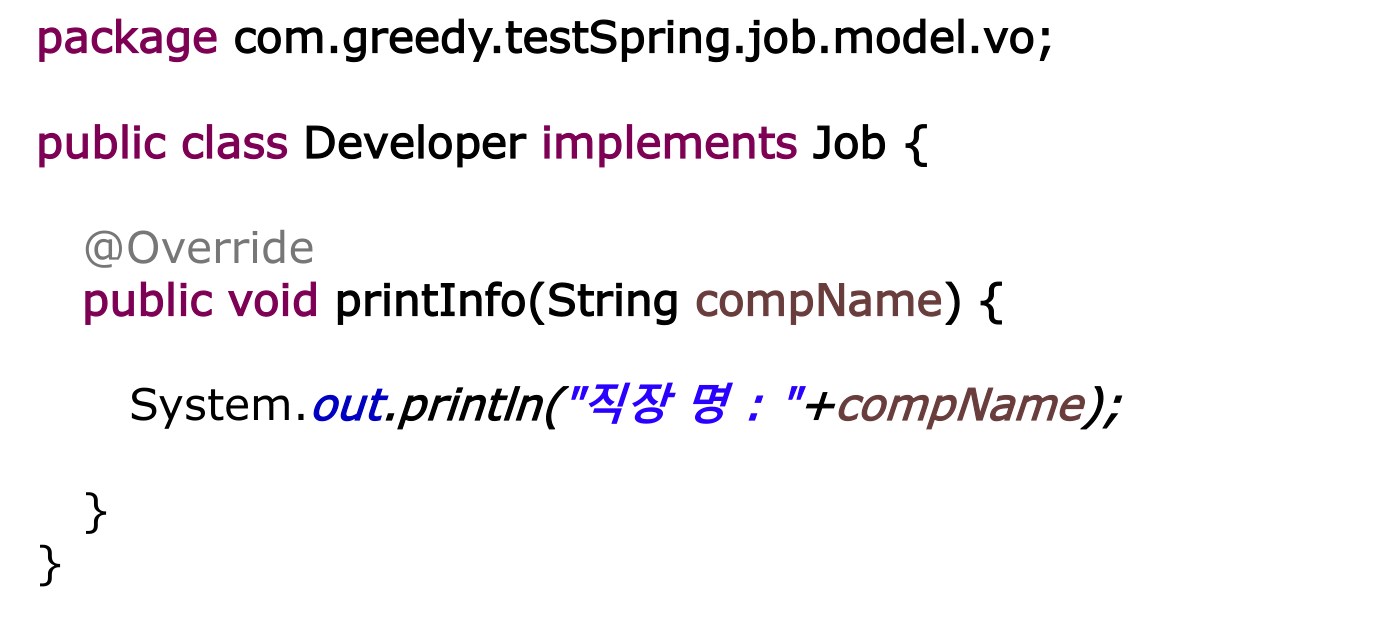
Developer Class


Job 인터페이스를 상속 받는 Developer 객체를 만든다.


GenericXmlApplicationContext 생성


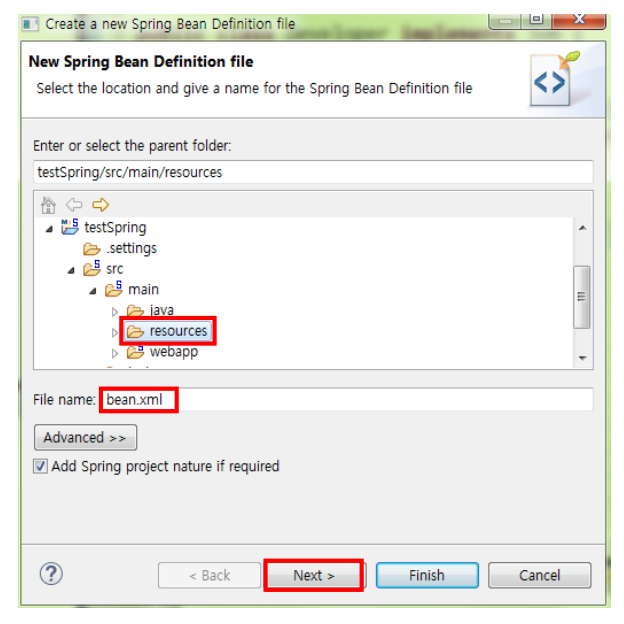
  • resources 폴더를 우클릭하여 Spring Bean Configuration File 을 클릭한다.
  • 만약 해당 목록이 보이지 않는다면 Other... 를 선택하여 spring tab에 있는 목록을 통해 진행


  • resources 폴더 경로를 확인하고, 파일의 이름을 bean.xml로 지은 뒤 Next
  • 사용할 xml 파일의 이름은 반드시 같지 않아도 된다.


  • spring에서 제공하는 네임스페이스 중 Beans 를 선택
  • 버전은 최신버전을 선택한 뒤 Finish


  • 생성된 xml 을 확인 한 뒤, 다음과 같은 내용을 추가한다.


    <!-- 생성자를 사용하여 DI를 적용할 경우 -->
    <bean id="person" class="com.greedy.testSpring.person.model.vo.Person">
        <constructor-arg index="0" value="홍길동"/>
        <constructor-arg index="1" ref="job"/> <!-- name 속성도 가능 -->
    </bean>

    <!-- Setter를 사용하여 DI를 적용할 경우 -->
    <bean id="person2" class="com.greedy.testSpring.person.model.vo.Person">
        <!-- setName() -->
        <property name="name" value="이순신" />
        <!-- setmyJob() -->
        <property name="myJob" ref="job" />
    </bean>

    <bean id="job" class="com.greedy.testSpring.job.model.vo.Job" />


MyPersonTest 생성


생성된 xml 을 확인 한 뒤, 다음과 같은 내용을 추가한다.


public class MyPersonTest {
    public static void main(String[] args) {
        // 1. IoC Container 생성
        ApplicationContext context =
        new GenericXmlApplicationContext("config/beans.xml");

        // 2. Person 객체 생성
        Person p1 = (Person) context.getBean("person1");

        // 3. Job객체 가져오기
        Job myJob = context.getBean("job", Job.class);

        // 4. 생성한 객체를 싱글톤 패턴으로 가져옴을 확인
        Person p2= (Person) context.getBean("person2", Person.class);
    }
}


'Programming > Spring Framework' 카테고리의 다른 글

5. Spring AOP (1)  (0) 2022.04.11
4. Spring DI 관리  (0) 2022.04.07
3. Spring IOC (2)  (0) 2022.04.06
2. Spring Framework  (0) 2022.04.06
1. Apache Maven  (0) 2022.04.06


Spring Framework


Spring Framework란?


  • 자바 플랫폼을 위한 오픈소스 애플리케이션 프레임워크로서 간단히스프링(Spring)이라고도 불린다.
  • 동적인 웹 사이트를 개발하기 위한 여러 가지 서비스를 제공하고 있으며 대한민국 공공기관의 웹 서비스 개발 시 사용을 권장하고 있는 전자정부 표준프레임워크의 기반 기술로서 쓰이고 있 다.
  • Spring 공식 사이트 : https://spring.io/
 

Spring makes Java simple.

Level up your Java code and explore what Spring can do for you.

spring.io


Spring의 특징


Ⅰ. DI ( Dependancy Injection / 의존성 주입)

설정 파일이나 어노테이션을 통해 객체간 의존 관계를 설정하여 개발자가 직접 의존하는 객체를생성할 필요가 없다.


Ⅱ. Spring AOP ( 관점 지향 프로그래밍)

Database의 트랜잭션처리나 로깅처리와 같이 여러 모듈에서 공통으로 필요로 하는 기능의 경우 해당 기능을 분리하여 관리한다.


Ⅲ. Spring JDBC

Mybatis나 Hibernate 등의 데이터베이스를 처리하는 영속성 프레임워크와 연결할 수 있는 인터페이스를 제공한다.


Ⅳ. Spring MVC

MVC 디자인 패턴을 통해 웹 어플리케이션의 Model, View, Controller 사이의 의존 관계를 DI 컨테이너에서 관리하여 개발자가 아닌 서버가 객체들을 관리하는 웹 어플리케이션을 구축할 수 있다.


▼ 스프링 삼각형 ▼
더보기


스프링 삼각형

:스프링의 핵심가치 세가지


IoC : 제어의 역전 


  • 라이브러리와 프레임워크의 차이

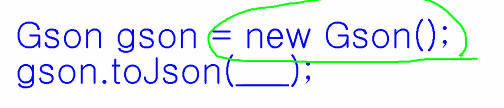
: 라이브러리는 JSON 라이브러리를 쓰고싶다면 다음과 같은 객체를 작성, Gson은 만들어져 있는 객체이고 이 만들어진 것들 가져다 쓴다. 즉, 개발자에게 주도권이 있는 상황


프레임 워크는 만들어져있는 틀이 이미있고 개발자는 new MemberLoginServlet 같은 객체를 생성한 적이 없다. 서블릿들은 톰갯이라는 was 서버에서 관리된다. was의 서블릿 콘테이너에서 관리. 


DI


: 결합단계를 낮춤으로서 유지보수성을 증가시킨다. 


AOP


: 관점지향 프로그래밍

- 관점 : 공통 관심사, 만든 클래스들이 모두 어떤 동일한 코드를 작성해야한다고 가정했을때 매 클래스에 전부 써주는 것보다 공통관심사를 한번 작성해 분리 해 놓고, 이 코드가 필요한 순간에 삽입시켜 동작시켜 주는 것이 효율적이다. 

즉, 응집도를 높이고 결합도를 낮춘다. 생산성과 유지보수성 증가


PSA (Portable Service Abstraction) 


- 가진 서비스의 특정 기술을 숨긴다. 사용한 어떤 특정기술이 업데이트 되더라도 숨겨놓음으로서 업데이트에 대한 부분만 수정되면 되지 이 기술변화에 대해서 개발자는 대응을 할 필요 없도록 함 프레임워크를 사용한 개발자의 비즈니스 로직은 변화되지않도록 함


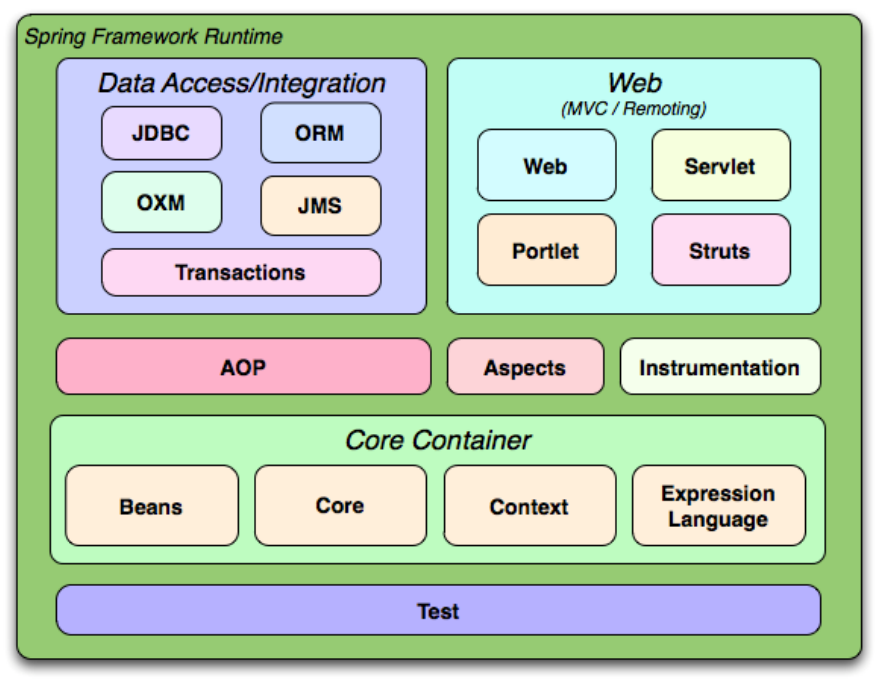
Spring의 구성 모듈


Core Container


  • Spring의 근간이 되는 IoC(또는 DI) 기능을 지원하는 영역을 담당하고 있다.
  • BeanFactory를 기반으로 Bean 클래스들을 제어할 수 있는 기능을 지원한다.


- Bean : 클래스, 스프링 프레임워크에 관리를 맡긴 클래스등을 이야기함 생성과 소멸들의 권한이 컨테이너에 있는 것
- Bean Factory : 위와같이 맡겨진 Bean 들을 관리 


Data 접근 계층


JDBC나 데이터 베이스에 연결하는 모듈, Data 트랜잭션에 해당하는 기능을 담당하여 영속성 프레임워크의 연결을 담당한다.


STS 설치


STS란?


  • Spring Tool Suite의 약자로, Spring Framework를 사용하기 위한 개발 툴을 말한다. 
  • 일반적으로는 별도의 설치 도구를 통해 설치하여 사용하나, 이클립스IDE에서 제공하는 STS plug-in을 통해 간단히 설치할 수 있다.
  • STS 공식 설치 사이트 : https://spring.io/tools/sts/all


Eclipse STS 설치


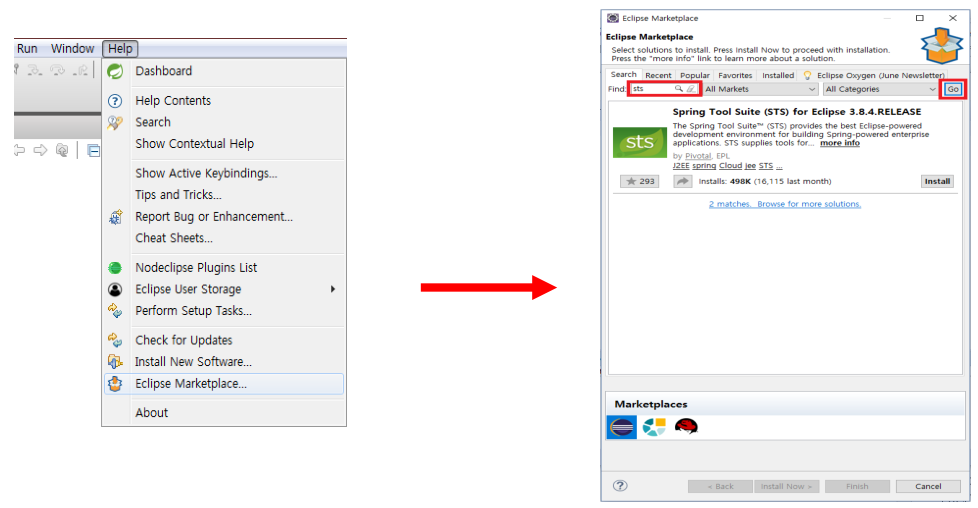
  • 이클립스 메뉴에서 [ Help ] - [ Eclipse Marketplace ]를 클릭하고 Find : sts 입력
  • [ Go ] 클릭 후 Spring Tool Suite 를 설치한다.


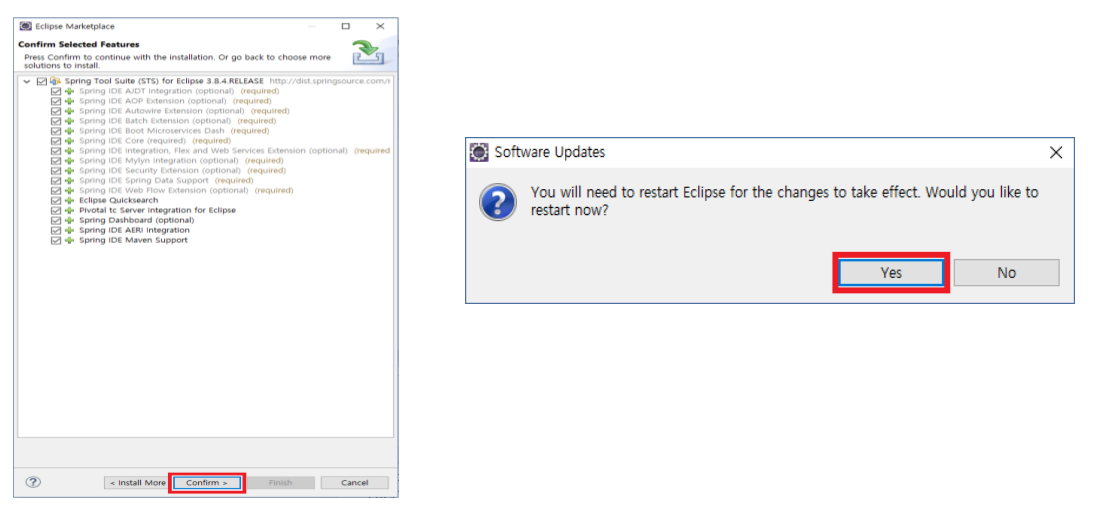
  • 설치 시 나오는 항목을 모두 선택하고, 설치가 완료되면 이클립스를 재실행한다.


  • 재 실행 시 다음과 같은 Spring Welcome page가 첫 화면에 보인다면 설치가 정상적으로 이루어 진 것이다.


Spring MVC


Spring MVC


  • Spring Framework 에서는 클라이언트의 화면을 표현하기 위한 View와 서비스를 수행하기 위한 개발 로직 부분(Model)을 나누는 MVC 2 패턴을 지원한다. 
  • 또한 Model, View, Controller사이의 의존 관계를 DI 컨테이너에서 관리하여 유연한 웹 어플리케이션을 쉽게 구현 및 개발할수 있다.


Spring MVC 요청 처리 과정


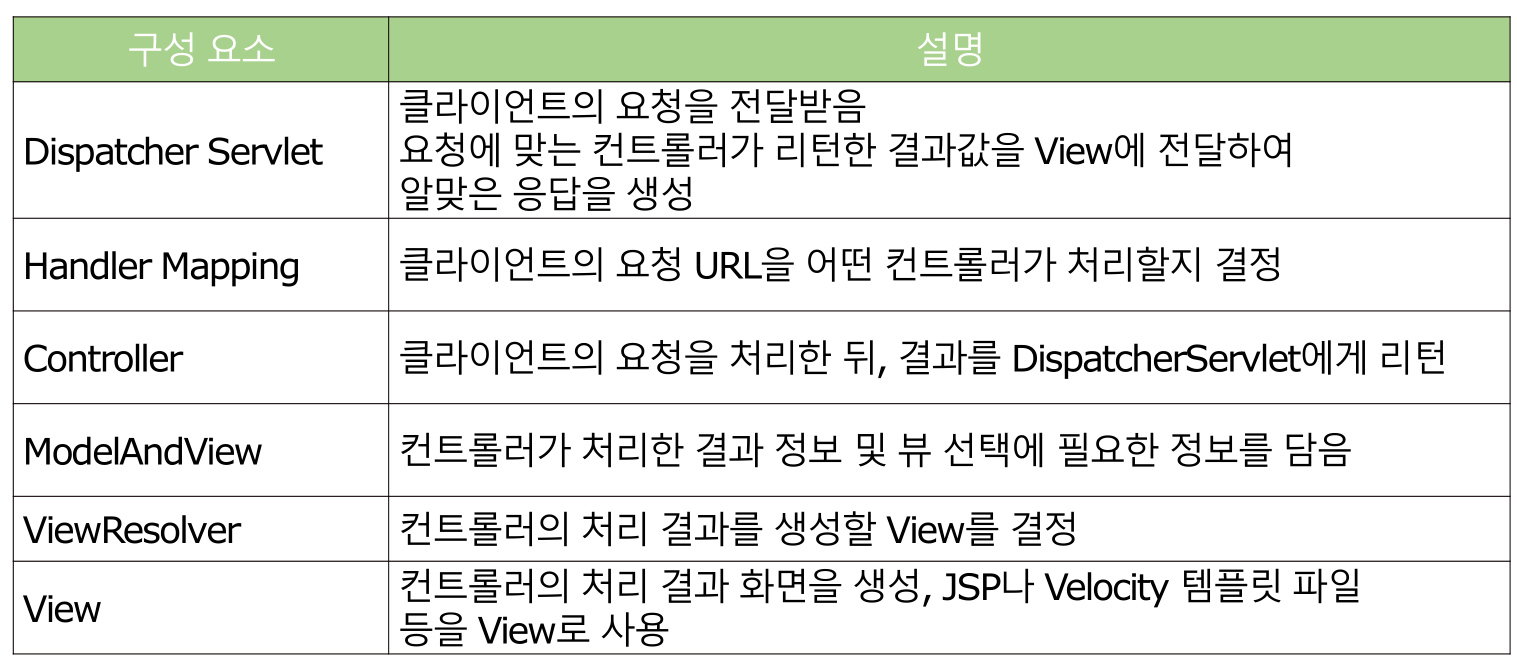
Spring MVC 구성 요소


  • 이클립스 [Window] - [Perspective] - [Customize Perspective]를 클릭


  • Shortcuts 탭에서 Spring Legacy Project를 선택하고 OK 클릭


  • Project Explorer 창에서 [New] - [Spring Legacy Project] 선택


  • 프로젝트 이름을 정하고, Template에서 Spring MVC를 선택 후 [Next]
  • 패키지 생성 창에서 'com.00000.프로젝트 명' 으로 패키지 생성


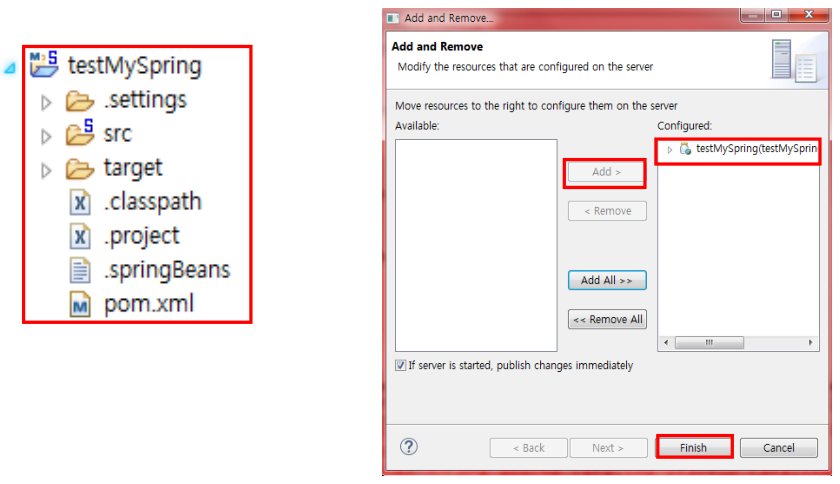
  • 생성이 완료된 프로젝트를 서버에 추가하고 프로젝트 명으로 접속한다.


  • 생성이 완료된 프로젝트를 서버에 추가하고 프로젝트 명으로 접속한다.


Spring 프로젝트 구조


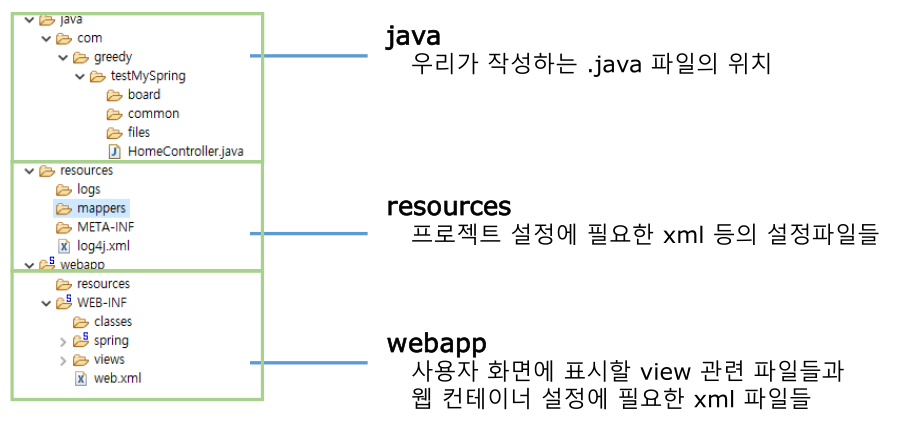
Spring 폴더 구조


Spring Framework는 다음과 같은 폴더 구조를 가진다.


main folder


main 폴더는 다음과 같은 구성을 가진다.


webapp folder


웹 상의 루트 역할인 webapp 폴더는 다음과 같은 구성을 가진다.


'Programming > Spring Framework' 카테고리의 다른 글

5. Spring AOP (1)  (0) 2022.04.11
4. Spring DI 관리  (0) 2022.04.07
3. Spring IOC (2)  (0) 2022.04.06
3. Spring IOC (1)  (0) 2022.04.06
1. Apache Maven  (0) 2022.04.06


Apache Maven


Maven이란?


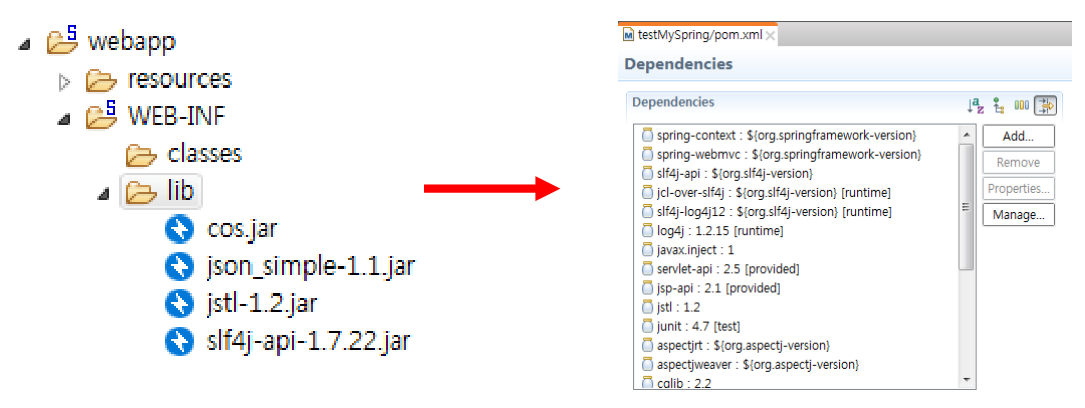
Maven이란 자바용 프로젝트 관리 도구로, project object model(POM) XML 문서를 통해 해당 프로젝트의 버전 정보 및 라이브러리 정보들을 통합하여 관리하는 프레임워크이다.


라이브러리 종속성


일반적인 프로젝트는 개발자가 필요한 라이브러리를 직접 찾아서 추가해야 하지만, Maven을 사용하면 pom.xml 문서에 사용하고자 하는 라이브러리를 등록하여 자동으로 프로젝트에 추가되게 하여 라이브러리 관리의 편리성을 제공해 준다.


Maven의 종속성


이제까지 프로젝트 내 lib 폴더에 사용할 라이브러리를 직접 추가하여 관리 해왔다면, maven은 pom.xml 문서 하나 만으로 필요한 라이브러리를 찾아서 자동으로 설치하고 관리할 수 있다.


POM이란?


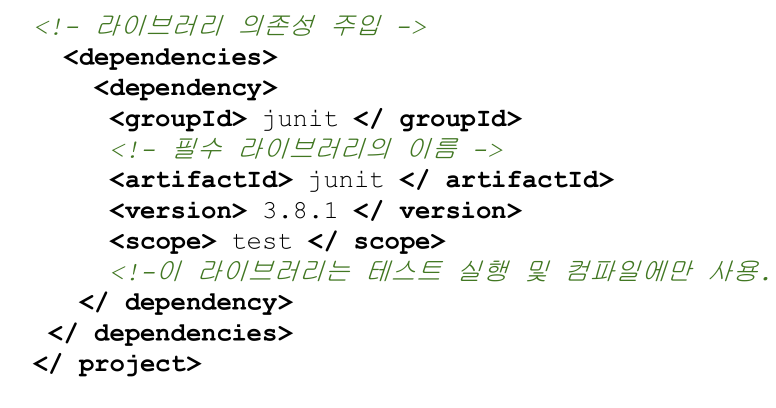
POM(Project Object Model)은 하나의 프로젝트에서 사용하는 자바 버전, 라이브러리, 플러그인 구성을 통합하여 관리할 수 있게 각 설정 정보를 XML 문서화 한 것을 말한다.


POM.XML 의 구성


Apache Maven 설치하기


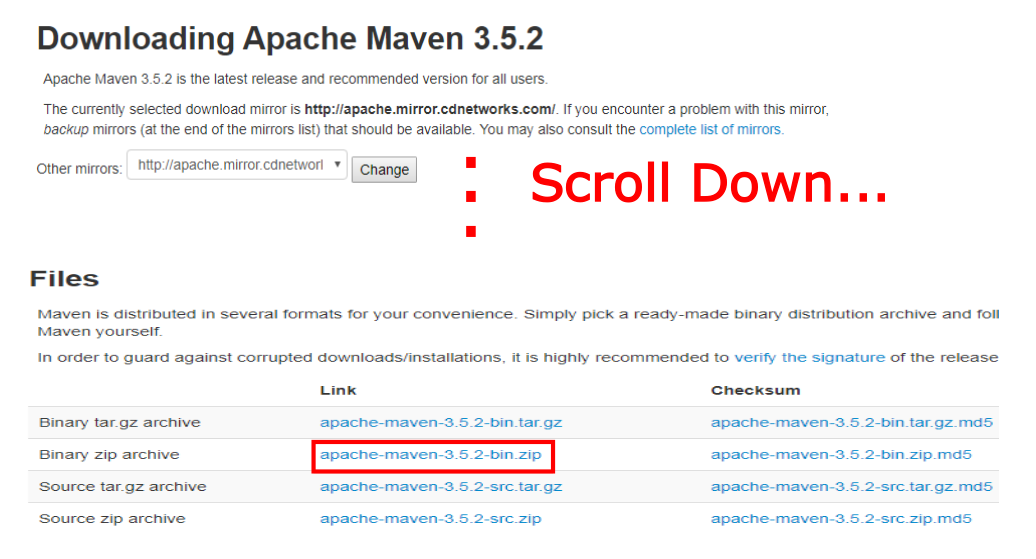
하기 경로를 통해 Apache Maven 사이트에 접속한다.


https://maven.apache.org/index.html


Maven – Welcome to Apache Maven

Welcome to Apache Maven Apache Maven is a software project management and comprehension tool. Based on the concept of a project object model (POM), Maven can manage a project's build, reporting and documentation from a central piece of information. If you

maven.apache.org


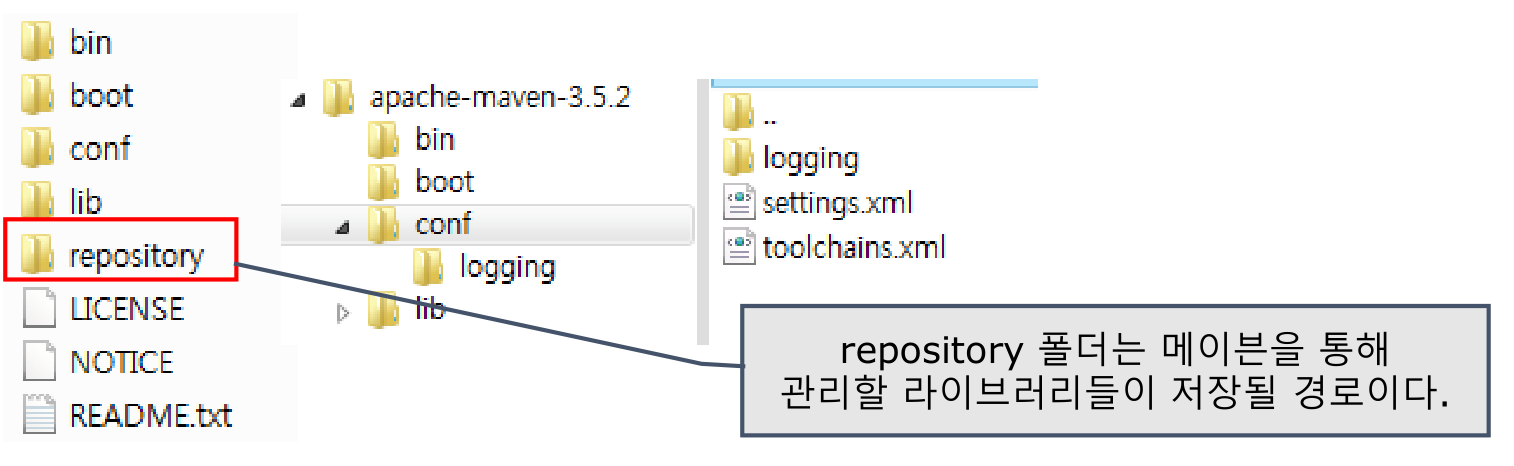
  • 다운로드 받은 압축 파일을 dev 폴더에 압축 해제 한 뒤, 같은 경로에 repository라는 저장소 역할의 새 폴더를 하나 만들고, conf 폴더로 접근하여 settings.xml 파일을 열람한다.


Apache Maven 라이브러리 저장소 설정


settings.xml 문서에서 localRepository 부분을 찾아 주석 바깥으로 뺀 뒤, 저장소로 이용하고자 하는 폴더로 설정한다.


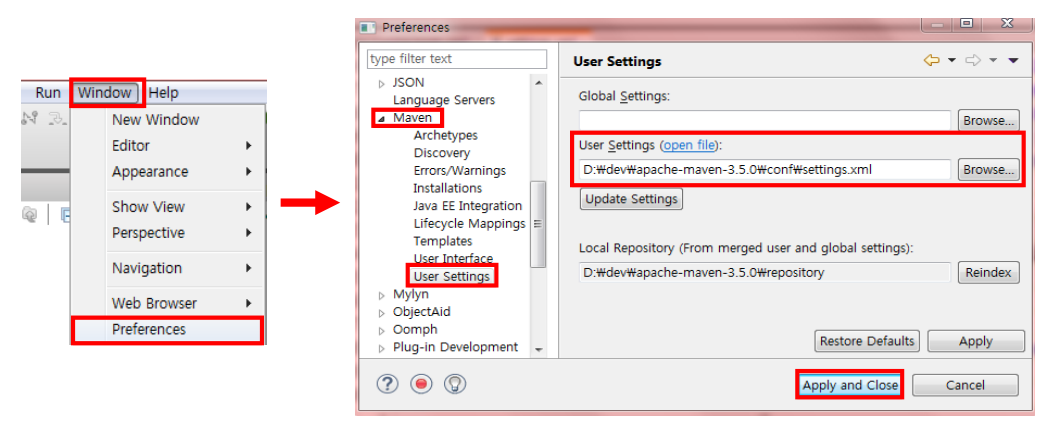
Eclipse와 Maven 연동


  • Eclipse를 실행하여 [Window] - [Preferences] - [Maven] - [User Settings] 에 접근
  • User Settings의 값을 이전에 설정한 conf 의 settings.xml의 위치로 변경한다.


Maven target 폴더


  • Maven을 사용할 경우 프로젝트 컴파일 시 target/classes 안에 컴파일 된 클래스 파일들이 위치하게 된다.
  • 일반적으로 maven clean 옵션을 사용하면 제거되어 문제는 없지만, 이후 형상관리를 위해 프로젝트 를 공유할 시 컴파일 된 결과까지 공유할 필요는 없기 때문에 target 폴더를 공유 목록에서 제외하는 Ignore 작업을 설정


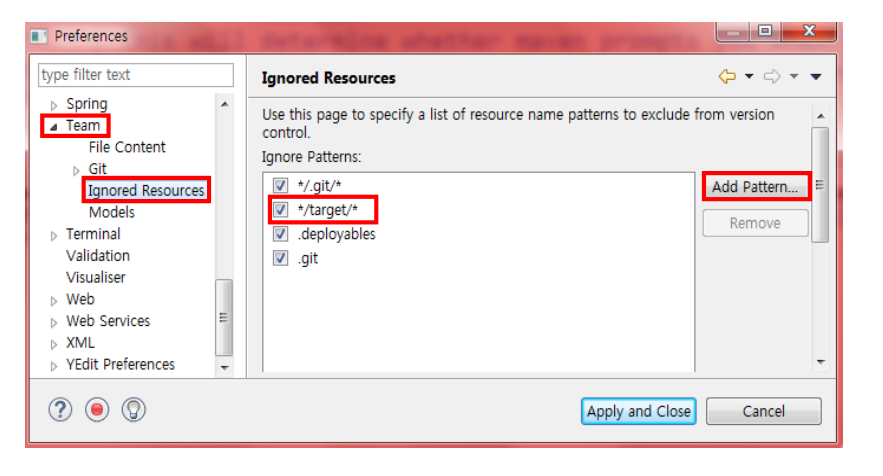
Eclipse target 폴더 제외


  • [Window] - [Preferences]를 선택
  • [Team] - [Ignored Resources] 에서 [Add Pattern]을 누른 뒤, */target/* 을 추가


'Programming > Spring Framework' 카테고리의 다른 글

5. Spring AOP (1)  (0) 2022.04.11
4. Spring DI 관리  (0) 2022.04.07
3. Spring IOC (2)  (0) 2022.04.06
3. Spring IOC (1)  (0) 2022.04.06
2. Spring Framework  (0) 2022.04.06


▼ 코드로 예시보기 ▼


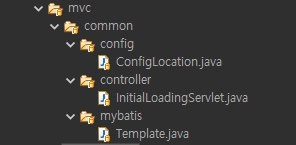
ConfigLocation

public class ConfigLocation {
	
	public static String mybatisConfigLocation;

}


 InitialLoadingServlet extends HttpServlet


import javax.servlet.ServletConfig;
import javax.servlet.ServletException;
import javax.servlet.annotation.WebServlet;
import javax.servlet.http.HttpServlet;

import com.greedy.mvc.common.config.ConfigLocation;

@WebServlet(urlPatterns= {}, loadOnStartup = 1)
public class InitialLoadingServlet extends HttpServlet {
    
	public void init(ServletConfig config) throws ServletException {
		
		ConfigLocation.mybatisConfigLocation
        = config.getServletContext().getInitParameter("mybatis-config-location");
		
		System.out.println(ConfigLocation.mybatisConfigLocation);
		
	}

}


Template


import java.io.IOException;
import java.io.InputStream;

import org.apache.ibatis.io.Resources;
import org.apache.ibatis.session.SqlSession;
import org.apache.ibatis.session.SqlSessionFactory;
import org.apache.ibatis.session.SqlSessionFactoryBuilder;

import com.greedy.mvc.common.config.ConfigLocation;

public class Template {

	private static SqlSessionFactory sqlSessionFactory;
	
	public static SqlSession getSqlSession() {
		
		if(sqlSessionFactory == null) {
			String resource = ConfigLocation.mybatisConfigLocation;
			
			try {
				InputStream inputStream = Resources.getResourceAsStream(resource);
				sqlSessionFactory = new SqlSessionFactoryBuilder().build(inputStream);
			} catch (IOException e) {
				e.printStackTrace();
			}
		}
		
		return sqlSessionFactory.openSession(false);
	}
	
}


SelectOneEmpByIdServlet extends HttpServlet

import java.io.IOException;
import javax.servlet.ServletException;
import javax.servlet.annotation.WebServlet;
import javax.servlet.http.HttpServlet;
import javax.servlet.http.HttpServletRequest;
import javax.servlet.http.HttpServletResponse;

import com.greedy.mvc.employee.model.dto.EmployeeDTO;
import com.greedy.mvc.employee.model.service.EmployeeService;

@WebServlet("/employee/select")
public class SelectOneEmpByIdServlet extends HttpServlet {
	
	protected void doGet(HttpServletRequest request, HttpServletResponse response)
    throws ServletException, IOException {
		
		/* 전달한 파라미터 꺼내기 */
		String empId = request.getParameter("empId");
		
		System.out.println("empId : " + empId);
	
		/* 비즈니스 로직 호출 - 사번을 이용해 사원 정보 조회 */
		EmployeeService empService = new EmployeeService();
		EmployeeDTO selectedEmp = empService.selectOneEmpById(empId);
		
		System.out.println("selectedEmp : " + selectedEmp);
		
		/* 비즈니스 로직 실행 결과에 따라 뷰 연결 */
		String path = "";
		if(selectedEmp != null) {
			path = "/WEB-INF/views/employee/showEmpInfo.jsp";
			request.setAttribute("selectedEmp", selectedEmp);
		} else {
			path = "/WEB-INF/views/common/errorPage.jsp";
			request.setAttribute("message", "직원 정보 조회 실패!");
		}
		
		request.getRequestDispatcher(path).forward(request, response);
		
	}

}


EmployeeDAO


import org.apache.ibatis.session.SqlSession;

import com.greedy.mvc.employee.model.dto.EmployeeDTO;

public class EmployeeDAO {

	public EmployeeDTO selectEmpById(SqlSession session, String empId) {
		return session.selectOne("EmployeeDAO.selectEmpById", empId);
	}

}


EmployeeDTO

import java.sql.Date;

public class EmployeeDTO {

	private String empId;
	private String empName;
	private String empNo;
	private String email;
	private String phone;
	private String deptCode;
	private String jobCode;
	private String salLevel;
	private int salary;
	private double bonus;
	private String managerId;
	private java.sql.Date hireDate;
	private java.sql.Date entdate;
	private String entYn;
	
	public EmployeeDTO() {}

	public EmployeeDTO(String empId, String empName, String empNo,
    String email, String phone, String deptCode,
			String jobCode, String salLevel, int salary, 
            double bonus, String managerId, Date hireDate,
            Date entdate,
			String entYn) {
		super();
		this.empId = empId;
		this.empName = empName;
		this.empNo = empNo;
		this.email = email;
		this.phone = phone;
		this.deptCode = deptCode;
		this.jobCode = jobCode;
		this.salLevel = salLevel;
		this.salary = salary;
		this.bonus = bonus;
		this.managerId = managerId;
		this.hireDate = hireDate;
		this.entdate = entdate;
		this.entYn = entYn;
	}

	public String getEmpId() {
		return empId;
	}

	public void setEmpId(String empId) {
		this.empId = empId;
	}

	public String getEmpName() {
		return empName;
	}

	public void setEmpName(String empName) {
		this.empName = empName;
	}

	public String getEmpNo() {
		return empNo;
	}

	public void setEmpNo(String empNo) {
		this.empNo = empNo;
	}

	public String getEmail() {
		return email;
	}

	public void setEmail(String email) {
		this.email = email;
	}

	public String getPhone() {
		return phone;
	}

	public void setPhone(String phone) {
		this.phone = phone;
	}

	public String getDeptCode() {
		return deptCode;
	}

	public void setDeptCode(String deptCode) {
		this.deptCode = deptCode;
	}

	public String getJobCode() {
		return jobCode;
	}

	public void setJobCode(String jobCode) {
		this.jobCode = jobCode;
	}

	public String getSalLevel() {
		return salLevel;
	}

	public void setSalLevel(String salLevel) {
		this.salLevel = salLevel;
	}

	public int getSalary() {
		return salary;
	}

	public void setSalary(int salary) {
		this.salary = salary;
	}

	public double getBonus() {
		return bonus;
	}

	public void setBonus(double bonus) {
		this.bonus = bonus;
	}

	public String getManagerId() {
		return managerId;
	}

	public void setManagerId(String managerId) {
		this.managerId = managerId;
	}

	public java.sql.Date getHireDate() {
		return hireDate;
	}

	public void setHireDate(java.sql.Date hireDate) {
		this.hireDate = hireDate;
	}

	public java.sql.Date getEntdate() {
		return entdate;
	}

	public void setEntdate(java.sql.Date entdate) {
		this.entdate = entdate;
	}

	public String getEntYn() {
		return entYn;
	}

	public void setEntYn(String entYn) {
		this.entYn = entYn;
	}

	@Override
	public String toString() {
		return "EmployeeDTO [empId=" + empId + ", empName=" + empName + ", 
        empNo=" + empNo + ", email=" + email
				+ ", phone=" + phone + ", deptCode=" + deptCode + ", 
                jobCode=" + jobCode + ", salLevel=" + salLevel
				+ ", salary=" + salary + ", bonus=" + bonus + ",
                managerId=" + managerId + ", hireDate=" + hireDate
				+ ", entdate=" + entdate + ", entYn=" + entYn + "]";
	}


}


EmployeeService

import org.apache.ibatis.session.SqlSession;

import com.greedy.mvc.employee.model.dao.EmployeeDAO;
import com.greedy.mvc.employee.model.dto.EmployeeDTO;
import static com.greedy.mvc.common.mybatis.Template.getSqlSession;

public class EmployeeService {
	
	private final EmployeeDAO empDAO;
	
	public EmployeeService() {
		empDAO = new EmployeeDAO();
	}
	

	public EmployeeDTO selectOneEmpById(String empId) {
		
		/* SqlSession 생성 */
		SqlSession session = getSqlSession();
		
		/* SqlSession과 함께 정보를 전달하여 조회한다. */
		EmployeeDTO selectedEmp = empDAO.selectEmpById(session, empId);
		
		/* SqlSession 닫기 */
		session.close();
		
		/* 조회 결과 반환 */
		return selectedEmp;
	}

}


index.jsp

<%@ page language="java" contentType="text/html; charset=UTF-8"
    pageEncoding="UTF-8"%>
<!DOCTYPE html>
<html>
<head>
<meta charset="UTF-8">
<title>Insert title here</title>
</head>
<body>
	<jsp:forward page="/WEB-INF/views/main/main.jsp"/>
</body>
</html>


'Programming > Mybatis' 카테고리의 다른 글

Mybatis CURD 실습 (4)  (0) 2022.03.17
Mybatis CURD 실습 (3)  (0) 2022.03.17
Mybatis CURD 실습 (2)  (0) 2022.03.15
3. Mybatis 동적 SQL  (0) 2022.03.15
Mybatis CURD 실습 (1)  (0) 2022.03.14


▼ 코드로 예시보기 ▼


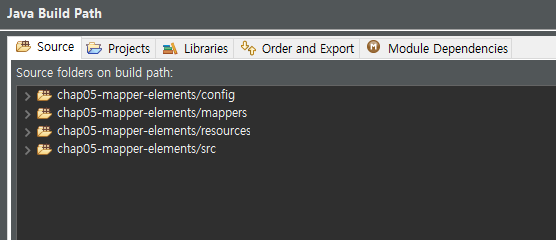
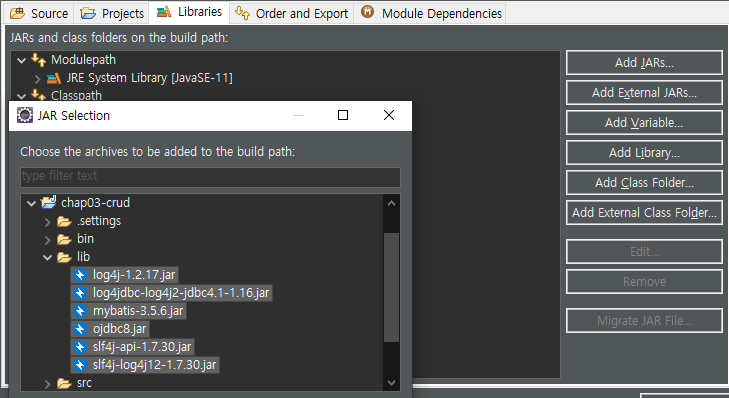
환경설정 및 Build Path


ElementTestMapper

<?xml version="1.0" encoding="UTF-8"?>
<!DOCTYPE mapper
  PUBLIC "-//mybatis.org//DTD Mapper 3.0//EN"
  "http://mybatis.org/dtd/mybatis-3-mapper.dtd">
<!-- 
	매퍼는 DAO 인터페이스와 동일한 패키지에 두고 DAO 인터페이스의 
	풀네임을 namespace로 지정해야 한다.
	또한 매퍼 인터페이스와 XML의 이름이 동일해야 하며
	작성한 메소드의 이름과 id가 일치하며 리턴 타입이 일치하는 
	쿼리문을 모두 작성해야 한다.
 -->
<mapper namespace="com.greedy.section01.xmlmapper.ElementTestMapper">
	
	<!--  Mapper xml에서 사용할 수 있는 엘리먼트는 총 9가지이다. -->
	<!-- <cache>, <cache-ref>, <resultMap>, <parameterMap>, <sql>, -->
	<!-- <select>, <insert>, <update>, <delete> -->
	
	<!-- 1. <cache> 엘리먼트 -->
	<!-- 
		cache와 cache-ref 엘리먼트는 캐시를 설정하는 엘리먼트이다.
		cache는 현재 네임스페이스에 대한 캐시 설정이고, cache-ref는 
		다른 네임스페이스에 대한 캐시 설정을 참조할 때 사용한다.
		캐시란?
		컴퓨터 과학에서 데이터나 값을 미리 복사해 놓은 임시 장소를 가리킨다.
		캐시 접근 시간에 비해 원래 데이터를 접근하는 시간이 오래 걸리는 경우나, 
		값을 다시 계산하는 시간을 절약하고 싶은 경우 사용한다.
		캐시에 데이터를 미리 복사해 놓으면 계산이나 접근 시간 없이 더 빠른 
		속도로 데이터에 접근할 수 있다.
	 -->
	 
	<cache eviction="LRU" flushInterval="1000" size="512" readOnly="true"/>
	
	<!-- 
		캐시의 디폴트 설정
		1. 매퍼 xml의 모든 select 구문의 결과를 캐시한다.
		2. 매퍼 xml의 insert, update, delete는 모두 캐시를 지운다.
		3. 가장 오랫동안 사용하지 않은 캐시를 지우는 알고리즘
		(LRU-Least Recently Used)을 사용한다.
		4. 애플리케이션이 실행되는 동안 캐시를 유지한다. 특정 시점에 사라지거나 하지 않는다.
		5. 캐시는 최대 1024개까지 저장한다.
		6. 캐시는 읽기/쓰기가 모두 가능하다.
	 --> 
	 <!-- 
	 	사용 가능 속성
	 	1. eviction : 캐시 알고리즘 속성이며 디폴트는 LRU이다.
	 	2. flushInterval : 설정 된 캐시를 얼마 동안 유지할지를 
	 	밀리초 단위로 설정하며, 양수여야 한다.
	 	3. size : 캐시에 저장할 객체 수를 지정한다. 디폴트는 1024이다.
	 	4. readonly : 읽기만 가능한 경우 캐시 데이터의 변경이 되지 않는다.
	  -->
	 
	
	<select id="selectCacheTest" resultType="java.lang.String">
		SELECT
		       MENU_NAME
		  FROM TBL_MENU
	</select>
	
	<!-- 2. <resultMap> 엘리먼트 -->
	<!-- 
		데이터베이스 결과 데이터를 객체에 로드하는 방법을 정의하는 엘리먼트이다.
		마이바티스에서 가장 중요하고 강력한 엘리먼트로 ResultSet에서 
		데이터를 가져올 때 작성 되는 JDBC 코드를 대부분
		줄여주는 역할을 담당한다. 
		
		1. id : 매핑 구문에서 결과 매핑을 사용할 때 구분하기 위한 아이디
		2. type : 결과 매핑을 적용하는 대상 객체 타입(매핑의 구문 결과
		 데이터를 저장할 자바 타입을 지정함
		3. extends : 자바의 상속처럼 기존에 정의 된 매핑 결과를 상속 
		받아 추가적인 매핑 정보로 확장할 때 사용함
		4. autoMapping : 결과 매핑을 자동 매핑 할 것인지 결정함
		                 오토 매핑 설정은 동일한 컬럼명이 있는 경우
		                  위험성을 가지기 때문에 사용하지 않는 것이 안전하다.
	 -->
	
	<resultMap id="menuResultMap1" type="com.greedy.common.MenuDTO"
	 autoMapping="false">
		<id property="code" column="MENU_CODE"/>
		<result property="name" column="MENU_NAME"/>
		<result property="price" column="MENU_PRICE"/>
		<result property="categoryCode" column="CATEGORY_CODE"/>
	</resultMap>
	<resultMap id="menuResultMap2" type="com.greedy.common.MenuDTO"
	 extends="menuResultMap1">
		<!-- 추가적인 속성만 넣으면 된다. -->
		<result property="orderableStatus" column="ORDERABLE_STATUS"/>
	</resultMap>
	
	<select id="selectResultMapTest" resultMap="menuResultMap2">
		SELECT 
		       MENU_CODE
		     , MENU_NAME
		     , MENU_PRICE
		     , CATEGORY_CODE
		     , ORDERABLE_STATUS
		  FROM TBL_MENU
		 WHERE ORDERABLE_STATUS = 'Y'
	</select>
	
	<!-- 2-1. resultMap의 하위 엘리먼트 -->
	<!-- 
		<id> : primary key 컬럼을 매핑하기 위한 태그이다.
		<result> : pk가 아닌 일반 컬럼에 매핑하기 위한 태그이다.
		<constructor> : 인스턴스화 되는 클래스의 생성자에 결과를 삽입하기 위해 
		사용한다. <idArg>, <arg> 하위 엘리먼트가 있다.
		<association> : 복잡한 타입의 연관관계로 1:1 포함 관계인 경우 사용한다.
		<collection> : 복잡한 타입의 연관 관계로 1:N 포함 관계인 경우 사용한다.
	 -->
	
	<!-- 2-1-1. <constructor> -->
	<resultMap id="menuResultMap3" type="com.greedy.common.MenuDTO">
		<!-- id, result 엘리먼트를 이용하면 setter를 이용하기 때문에 
		property를 지정하지만 생성자는 순서와 타입을 맞춰서 사용해야 한다. -->
		<constructor>
			<idArg column="MENU_CODE" javaType="_int"/>
			<arg column="MENU_NAME" javaType="string"/>
			<arg column="MENU_PRICE" javaType="_int"/>
			<arg column="CATEGORY_CODE" javaType="_int"/>
			<arg column="ORDERABLE_STATUS" javaType="string"/>
		</constructor>
	</resultMap>
	
	<select id="selectResultMapConstructorTest" resultMap="menuResultMap3">
		SELECT 
		       MENU_CODE
		     , MENU_NAME
		     , MENU_PRICE
		     , CATEGORY_CODE
		     , ORDERABLE_STATUS
		  FROM TBL_MENU
		 WHERE ORDERABLE_STATUS = 'Y'	
	</select>
	
	<!-- 2-1-2. <association> -->
	<!-- <association>은 중간에 넣으면 에러가 발생한다. 가장 마지막 부분에 넣어야 한다. -->
	
	<!-- 별도로 작성한 resultMap을 사용하는 방법 -->
<!-- 	<resultMap id="menuAndCategoryResultMap" 
		type="com.greedy.common.MenuAndCategoryDTO">
		<id property="code" column="MENU_CODE"/>
		<result property="name" column="MENU_NAME"/>
		<result property="price" column="MENU_PRICE"/>
		<result property="orderableStatus" column="ORDERABLE_STATUS"/>
		<association property="category" resultMap="categoryResultMap"/>
	</resultMap>
	<resultMap id="categoryResultMap" type="com.greedy.common.CategoryDTO">
		<id property="code" column="CATEGORY_CODE"/>
		<result property="name" column="CATEGORY_NAME"/>
		<result property="refCategoryCode" column="REF_CATEGORY_CODE"/>
	</resultMap> -->
	
	<!-- association 내에 id, result 작성하는 방법 -->
	<resultMap id="menuAndCategoryResultMap"
			 type="com.greedy.common.MenuAndCategoryDTO">
		<id property="code" column="MENU_CODE"/>
		<result property="name" column="MENU_NAME"/>
		<result property="price" column="MENU_PRICE"/>
		<result property="orderableStatus" column="ORDERABLE_STATUS"/>
		<association property="category" 
						javaType="com.greedy.common.CategoryDTO">
			<id property="code" column="CATEGORY_CODE"/>
			<result property="name" column="CATEGORY_NAME"/>
			<result property="refCategoryCode" column="REF_CATEGORY_CODE"/>
		</association>
	</resultMap>

	
	<select id="selectResultMapAssociationTest" 
	resultMap="menuAndCategoryResultMap">
		SELECT 
		       MENU_CODE
		     , MENU_NAME
		     , MENU_PRICE
		     , CATEGORY_CODE
		     , CATEGORY_NAME
		     , REF_CATEGORY_CODE
		     , ORDERABLE_STATUS
		  FROM TBL_MENU
		  JOIN TBL_CATEGORY USING (CATEGORY_CODE)
		 WHERE ORDERABLE_STATUS = 'Y'		
	</select>
	
	<!-- 2-1-3. <collection> -->
	
	<!-- 따로 만든 resultMap을 사용하는 방법 -->
<!-- 	<resultMap type="com.greedy.common.CategoryAndMenuDTO" 
					id="categoryAndMenuResultMap">
		<id property="code" column="CATEGORY_CODE"/>
		<result property="name" column="CATEGORY_NAME"/>
		<result property="refCategoryCode" column="REF_CATEGORY_CODE"/>
		<collection property="menuList" resultMap="menuResultMap"/>
	</resultMap>
	<resultMap type="com.greedy.common.MenuDTO" id="menuResultMap">
		<id property="code" column="MENU_CODE"/>
		<result property="name" column="MENU_NAME"/>
		<result property="price" column="MENU_PRICE"/>
		<result property="categoryCode" column="CATEGORY_CODE"/>
		<result property="orderableStatus" column="ORDERABLE_STATUS"/>
	</resultMap> -->
	
	<!-- collection 내에 id, result 작성하는 방법 -->
	<resultMap type="com.greedy.common.CategoryAndMenuDTO"
				 id="categoryAndMenuResultMap">
		<id property="code" column="CATEGORY_CODE"/>
		<result property="name" column="CATEGORY_NAME"/>
		<result property="refCategoryCode" column="REF_CATEGORY_CODE"/>
		<collection property="menuList" ofType="com.greedy.common.MenuDTO">
			<id property="code" column="MENU_CODE"/>
			<result property="name" column="MENU_NAME"/>
			<result property="price" column="MENU_PRICE"/>
			<result property="categoryCode" column="CATEGORY_CODE"/>
			<result property="orderableStatus" column="ORDERABLE_STATUS"/>
		</collection>
	</resultMap>
	
	<select id="selectResultMapCollectionTest" 
			resultMap="categoryAndMenuResultMap">
		SELECT
		       A.CATEGORY_CODE
		     , A.CATEGORY_NAME
		     , A.REF_CATEGORY_CODE
		     , B.MENU_CODE
		     , B.MENU_NAME
		     , B.MENU_PRICE
		     , B.CATEGORY_CODE
		     , B.ORDERABLE_STATUS
		  FROM TBL_CATEGORY A
		  LEFT JOIN TBL_MENU B ON (A.CATEGORY_CODE = B.CATEGORY_CODE)
		 ORDER BY A.CATEGORY_CODE 
	</select>
	
	<!-- 3. <sql> 엘리먼트 -->
	<!-- 
		각 매핑 구문에서 공통으로 사용할 수 있는 SQL 
		문자열의 일부를 정의하고 재사용하기 위해 사용한다.
	 -->
	<sql id="columns">
		MENU_CODE
	  , MENU_NAME
	  , MENU_PRICE
	  , CATEGORY_CODE
	  , ORDERABLE_STATUS
	</sql>
	
	<select id="selectSqlTest" resultMap="menuResultMap2">
		SELECT
		<include refid="columns"/>
		  FROM TBL_MENU
		 WHERE ORDERABLE_STATUS = 'Y'
	</select>
	
	<!-- 4. <insert> 엘리먼트 -->
	<!-- 
		insert, update, delete 엘리먼트는 사용하는 속성이 
		대부분 동일하지만 insert 엘리먼트는 좀 더 많은 속성을 정의할 수 있다.
		
		공통 속성
		id : 매핑 구문을 구분하는 아이디
		parameterType : 파라미터의 타입을 지정한다. 이미 정의 된 
		별칭이 있다면 사용할 수도 있고, 클래스의 full-name을 적어주면 된다.
	 	flushCache : 매핑 구문을 실행할 때 캐시를 지울지 여부를 설정한다.
	 	timeout : sql을 실행한 후 응답을 기다리는 최대 시간이다. 
	 	대게는 설정하지 않고 JDBC 드라이버 자체의 타임아웃 값을 그대로 사용한다.
	 	statementType : JDBC 구문 타입을 지정한다. 
	 	STATEMENT, PREPARED, CALLABLE 중 하나를 쓸 수 있으며 기본 값은 PREPARED이다.
	 
	 	insert 추가 속성
	 	keyProperty : insert 구문의 하위 엘리먼트인 
	 	selectKey 엘리먼트에 의한 반환값을 설정할 프로퍼티를 지정함
	 -->
	
	<insert id="insertNewCategory">
		INSERT 
		  INTO TBL_CATEGORY
		(
		  CATEGORY_CODE
		, CATEGORY_NAME
		, REF_CATEGORY_CODE
		)
		VALUES
		(
		  SEQ_CATEGORY_CODE.NEXTVAL
		, #{ category.name }
		, NULL
		)
	</insert>
	
	<insert id="insertNewMenu">
		<selectKey keyProperty="category.code" order="BEFORE" resultType="_int">
			SELECT
			       SEQ_CATEGORY_CODE.CURRVAL
			  FROM DUAL
		</selectKey>
		INSERT
		  INTO TBL_MENU
		(
		  MENU_CODE
		, MENU_NAME
		, MENU_PRICE
		, CATEGORY_CODE
		, ORDERABLE_STATUS
		)
		VALUES
		(
		  SEQ_MENU_CODE.NEXTVAL
		, #{ name }
		, #{ price }
		, #{ category.code }
		, #{ orderableStatus }
		)
	</insert>
	
	<!-- 5. <select> 엘리먼트 -->
	<!-- 
		자주 사용되는 속성
	    select 엘리먼트의 경우 많이 사용되는 속성은 앞에서 다룬 속성들이다.
	    id : 매핑 구문을 구분하는 아이디이다.
	    parameterType : 파라미터의 타입을 의미한다. 이미 정의된 타입을
	     사용할 수 있으며, 개발자가 정의한 타입을 사용하는 경우 full-name을 기술한다.
	    resultType : 매핑 구문의 결과 행 타입이다. 전체 결과의 타입을 
	    지정하는 것이 아닌 1 row에 해당하는 타입을 설정해야 한다.
	    resultMap : 매핑 구문의 결과 행을 미리 선언한 resultMap을
	     이용한다는 의미이다. 전체 행이 아닌 1 row에 해당하는 resultMap을 지정한다.
	    
	    자주 사용되지 않는 속성
	    flushCache : 구문을 호출할 때마다 캐시를 지울지 여부를 설정한다.
	    useCache : 구문의 결과를 캐시한다. 기본값 true
	    timeout : 구문을 실행하고 응답을 기다리는 최대 시간이다. 
	    대게는 설정하지 않고 JDBC 드라이버 자체의 타임아웃 값을 그대로 사용한다.
	    fetchSize : 지정된 수 만큼의 결과를 반환하게 하는 드라이버
	     힌트 형태의 값이다. 디폴트는 설정하지 않는 것이며 일부 드라이버는 지원하지 않는다.
	    statementType : JDBC의 구문 타입을 지정한다. 
	    STATEMENT, PREPARED, CALLABLE 중 하나이며 디폴트는 PREPARED이다.
	    resultSetType : ResultSet의 커서 이동 방향을 지정한다. 
	    FORWARD_ONLY, SCROLL_SENSITIVE, SCROLL_INSENCITIVE 중 하나를 설정한다.
	                    기본값은 FORWARD_ONLY이며, 커서가 앞으로만 이동한다.
	                    SCROLL_SENSITIVE는 커서가 앞뒤로 이동할 수 있고,
	                     ResultSet 객체 생성 후 추가 및 삭제된 데이터도 볼 수 있다.
	                    SCROLL_INSENSITIVE는 커서가 앞뒤로 이동할 수 
	                    있지만 ResultSet 객체 생성 후 추가 및 삭제된 데이터는 볼 수 없다.
	 -->


</mapper>


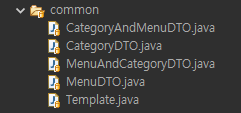
CategoryAndMenuDTO

import java.util.List;

public class CategoryAndMenuDTO {
	
	private int code;
	private String name;
	private Integer refCategoryCode;
	private List<MenuDTO> menuList;
	
	public CategoryAndMenuDTO() {}

	public CategoryAndMenuDTO(int code, String name, 
    Integer refCategoryCode, List<MenuDTO> menuList) {
		super();
		this.code = code;
		this.name = name;
		this.refCategoryCode = refCategoryCode;
		this.menuList = menuList;
	}

	public int getCode() {
		return code;
	}

	public void setCode(int code) {
		this.code = code;
	}

	public String getName() {
		return name;
	}

	public void setName(String name) {
		this.name = name;
	}

	public Integer getRefCategoryCode() {
		return refCategoryCode;
	}

	public void setRefCategoryCode(Integer refCategoryCode) {
		this.refCategoryCode = refCategoryCode;
	}

	public List<MenuDTO> getMenuList() {
		return menuList;
	}

	public void setMenuList(List<MenuDTO> menuList) {
		this.menuList = menuList;
	}

	@Override
	public String toString() {
		return "CategoryAndMenuDTO 
        [code=" + code + ", name=" + name + ", refCategoryCode=" + refCategoryCode
				+ ", menuList=" + menuList + "]";
	}


}


CategoryDTO

public class CategoryDTO {
	
	private int code;
	private String name;
	private Integer refCategoryCode;
	
	public CategoryDTO () {}

	public CategoryDTO(int code, String name, Integer refCategoryCode) {
		super();
		this.code = code;
		this.name = name;
		this.refCategoryCode = refCategoryCode;
	}

	public int getCode() {
		return code;
	}

	public void setCode(int code) {
		this.code = code;
	}

	public String getName() {
		return name;
	}

	public void setName(String name) {
		this.name = name;
	}

	public Integer getRefCategoryCode() {
		return refCategoryCode;
	}

	public void setRefCategoryCode(Integer refCategoryCode) {
		this.refCategoryCode = refCategoryCode;
	}

	@Override
	public String toString() {
		return "CategoryDTO 
        [code=" + code + ", name=" + name + ", 
        refCategoryCode=" + refCategoryCode + "]";
	}


}


MenuAndCategoryDTO


public class MenuAndCategoryDTO {
	
	private int code;
	private String name;
	private int price;
	private CategoryDTO category;
	private String orderableStatus;
	
	public MenuAndCategoryDTO () {}

	public MenuAndCategoryDTO(int code, String name, 
    int price, CategoryDTO category, String orderableStatus) {
		super();
		this.code = code;
		this.name = name;
		this.price = price;
		this.category = category;
		this.orderableStatus = orderableStatus;
	}

	public int getCode() {
		return code;
	}

	public void setCode(int code) {
		this.code = code;
	}

	public String getName() {
		return name;
	}

	public void setName(String name) {
		this.name = name;
	}

	public int getPrice() {
		return price;
	}

	public void setPrice(int price) {
		this.price = price;
	}

	public CategoryDTO getCategory() {
		return category;
	}

	public void setCategory(CategoryDTO category) {
		this.category = category;
	}

	public String getOrderableStatus() {
		return orderableStatus;
	}

	public void setOrderableStatus(String orderableStatus) {
		this.orderableStatus = orderableStatus;
	}

	@Override
	public String toString() {
		return "MenuAndCategoryDTO 
        [code=" + code + ", name=" + name + ", 
        price=" + price + ", category=" + category
		+ ", orderableStatus=" + orderableStatus + "]";
	}


}


MenuDTO


public class MenuDTO {
	
	private int code;
	private String name;
	private int price;
	private int categoryCode;
	private String orderableStatus;
	
	public MenuDTO() {}

	public MenuDTO(int code, String name, int price
    , int categoryCode, String orderableStatus) {
		super();
		this.code = code;
		this.name = name;
		this.price = price;
		this.categoryCode = categoryCode;
		this.orderableStatus = orderableStatus;
	}

	public int getCode() {
		return code;
	}

	public void setCode(int code) {
		this.code = code;
	}

	public String getName() {
		return name;
	}

	public void setName(String name) {
		this.name = name;
	}

	public int getPrice() {
		return price;
	}

	public void setPrice(int price) {
		this.price = price;
	}

	public int getCategoryCode() {
		return categoryCode;
	}

	public void setCategoryCode(int categoryCode) {
		this.categoryCode = categoryCode;
	}

	public String getOrderableStatus() {
		return orderableStatus;
	}

	public void setOrderableStatus(String orderableStatus) {
		this.orderableStatus = orderableStatus;
	}

	@Override
	public String toString() {
		return "MenuDTO [code=" + code + ", name=" + name + "
        , price=" + price + ", categoryCode=" + categoryCode
				+ ", orderableStatus=" + orderableStatus + "]";
	}


}


Template


import java.io.IOException;
import java.io.InputStream;

import org.apache.ibatis.io.Resources;
import org.apache.ibatis.session.SqlSession;
import org.apache.ibatis.session.SqlSessionFactory;
import org.apache.ibatis.session.SqlSessionFactoryBuilder;

public class Template {
	
	private static SqlSessionFactory sqlSessionFactory;
	
	public static SqlSession getSqlSession() {
		
		if(sqlSessionFactory == null) {
			String resource = "mybatis-config.xml";
			try {
				InputStream inputStream = Resources.getResourceAsStream(resource);
				sqlSessionFactory
                = new SqlSessionFactoryBuilder().build(inputStream);			
			} catch (IOException e) {
				e.printStackTrace();
			}
		}

		return sqlSessionFactory.openSession(false);
		
	}

}


Application

package com.greedy.section01.xmlmapper;

import java.util.Scanner;

import com.greedy.common.CategoryDTO;
import com.greedy.common.MenuAndCategoryDTO;

public class Application {

	public static void main(String[] args) {
		
		Scanner sc = new Scanner(System.in);
		ElementTestService elementTestService = new ElementTestService();
		
		do {
			System.out.println("========== mapper element 테스트 메뉴 ==========");
			System.out.println("1. <cache> 테스트");
			System.out.println("2. <resultMap> 서브 메뉴");
			System.out.println("3. <sql> 테스트");
			System.out.println("4. <insert> 테스트");
			System.out.print("메뉴 번호를 입력하세요 : ");
			int no = sc.nextInt();
			
			switch(no) {
			case 1 : elementTestService.selectCacheTest(); break;
			case 2 : resultMapSubMenu(); break;
			case 3 : elementTestService.selectSqlTest(); break;
			case 4 : 
            elementTestService.insertCategoryAndMenuTest(inputMenuAndCategory());
            		break;
			}
		} while(true);
		
	}

	private static void resultMapSubMenu() {
		
		Scanner sc = new Scanner(System.in);
		ElementTestService elementTestService = new ElementTestService();
		
		do {
			System.out.println("========== <resultMap> 서브 메뉴 ==========");
			System.out.println("1. <resultMap> 테스트");
			System.out.println("2. <constructor> 테스트");
			System.out.println("3. <association> 테스트");
			System.out.println("4. <collection> 테스트");
			System.out.print("메뉴 번호를 입력하세요 : ");
			int no = sc.nextInt();
			
			switch(no) {
			case 1 : elementTestService.selectResultMapTest(); break;
			case 2 : elementTestService.selectResultMapConstructorTest(); break;
			case 3 : elementTestService.selectResultMapAssociationTest(); break;
			case 4 : elementTestService.selectResultMapCollectionTest(); break;
			}
			
		} while(true);
	}
	
	private static MenuAndCategoryDTO inputMenuAndCategory () {
		
		Scanner sc = new Scanner(System.in);
		System.out.print("신규 카테고리명을 입력하세요 : ");
		String categoryName = sc.nextLine();
		System.out.print("등록할 메뉴 이름을 입력하세요 : ");
		String menuName = sc.nextLine();
		System.out.print("메뉴의 가격을 입력하세요 : ");
		int menuPrice = sc.nextInt();
		System.out.print("바로 판매 등록을 할까요?(Y/N) : ");
		sc.nextLine();
		String orderableStatus = sc.nextLine();
		
		MenuAndCategoryDTO menuAndCategory = new MenuAndCategoryDTO();
		CategoryDTO category = new CategoryDTO();
		
		menuAndCategory.setName(menuName);
		menuAndCategory.setPrice(menuPrice);
		menuAndCategory.setOrderableStatus(orderableStatus);
		category.setName(categoryName);
		
		menuAndCategory.setCategory(category);
		
		return menuAndCategory;
		
	}


}


interface ElementTestMapper

package com.greedy.section01.xmlmapper;

import java.util.List;

import com.greedy.common.CategoryAndMenuDTO;
import com.greedy.common.MenuAndCategoryDTO;
import com.greedy.common.MenuDTO;

public interface ElementTestMapper {

	List<String> selectCacheTest();

	List<MenuDTO> selectResultMapTest();

	List<MenuDTO> selectResultMapConstructorTest();

	List<MenuAndCategoryDTO> selectResultMapAssociationTest();

	List<CategoryAndMenuDTO> selectResultMapCollectionTest();

	List<MenuDTO> selectSqlTest();

	int insertNewCategory(MenuAndCategoryDTO menuAndCategory);

	int insertNewMenu(MenuAndCategoryDTO menuAndCategory);

}


ElementTestService


import static com.greedy.common.Template.getSqlSession;

import java.util.List;

import org.apache.ibatis.session.SqlSession;

import com.greedy.common.CategoryAndMenuDTO;
import com.greedy.common.MenuAndCategoryDTO;
import com.greedy.common.MenuDTO;

public class ElementTestService {

	private ElementTestMapper mapper;
	
	public void selectCacheTest() {
		
		SqlSession sqlSession = getSqlSession();
		mapper = sqlSession.getMapper(ElementTestMapper.class);
		
		/* 처음 요청 시에는 시간이 걸리지만 그 이후에는 
        캐싱된 데이터를 불러오기 때문에 속도가 빠르다 */
		for(int i = 0; i < 10; i++) {
			
			Long startTime = System.currentTimeMillis();
			
			List<String> nameList = mapper.selectCacheTest();
			System.out.println(nameList);
			
			Long endTime = System.currentTimeMillis();
			
			Long interval = endTime - startTime;
			System.out.println("수행 시간 : " + interval + "(ms)");

		}
		
		sqlSession.close();
		
	}

	public void selectResultMapTest() {
		
		SqlSession sqlSession = getSqlSession();
		mapper = sqlSession.getMapper(ElementTestMapper.class);
		
		List<MenuDTO> menuList = mapper.selectResultMapTest();
		for(MenuDTO menu : menuList) {
			System.out.println(menu);
		}
		
		sqlSession.close();
		
	}

	public void selectResultMapConstructorTest() {
		
		SqlSession sqlSession = getSqlSession();
		mapper = sqlSession.getMapper(ElementTestMapper.class);
		
		List<MenuDTO> menuList = mapper.selectResultMapConstructorTest();
		for(MenuDTO menu : menuList) {
			System.out.println(menu);
		}
		
		sqlSession.close();
		
	}

	public void selectResultMapAssociationTest() {
		
		SqlSession sqlSession = getSqlSession();
		mapper = sqlSession.getMapper(ElementTestMapper.class);
		
		List<MenuAndCategoryDTO> menuList
        = mapper.selectResultMapAssociationTest();
		for(MenuAndCategoryDTO menu : menuList) {
			System.out.println(menu);
		}
		
		sqlSession.close();
		
	}

	public void selectResultMapCollectionTest() {
		
		SqlSession sqlSession = getSqlSession();
		mapper = sqlSession.getMapper(ElementTestMapper.class);
		
		List<CategoryAndMenuDTO> categoryList
        = mapper.selectResultMapCollectionTest();
		
		for(CategoryAndMenuDTO category : categoryList) {
			System.out.println(category);
		}
		
		sqlSession.close();
		
	}

	public void selectSqlTest() {
		
		SqlSession sqlSession = getSqlSession();
		mapper = sqlSession.getMapper(ElementTestMapper.class);
		
		List<MenuDTO> menuList = mapper.selectSqlTest();
		for(MenuDTO menu : menuList) {
			System.out.println(menu);
		}
		
		sqlSession.close();
		
	}

	public void insertCategoryAndMenuTest(MenuAndCategoryDTO menuAndCategory) {
		
		SqlSession sqlSession = getSqlSession();
		mapper = sqlSession.getMapper(ElementTestMapper.class);
		
		int result1 = mapper.insertNewCategory(menuAndCategory);
		int result2 = mapper.insertNewMenu(menuAndCategory);
		
		if(result1 > 0 && result2 > 0) {
			System.out.println("신규 카테고리와 메뉴 등록 성공!");
			sqlSession.commit();
		} else {
			System.out.println("신규 카테고리와 메뉴 등록 실패!");
			sqlSession.rollback();
		}
		
		sqlSession.close();
		
	}


}


'Programming > Mybatis' 카테고리의 다른 글

Mybatis CURD 실습 (5)  (0) 2022.03.17
Mybatis CURD 실습 (3)  (0) 2022.03.17
Mybatis CURD 실습 (2)  (0) 2022.03.15
3. Mybatis 동적 SQL  (0) 2022.03.15
Mybatis CURD 실습 (1)  (0) 2022.03.14


▼ 코드로 예시보기 ▼


환경설정 및 Build Path


Section01


Application 

import java.util.ArrayList;
import java.util.Collections;
import java.util.HashMap;
import java.util.HashSet;
import java.util.List;
import java.util.Map;
import java.util.Scanner;
import java.util.Set;

import com.greedy.common.SearchCriteria;

public class Application {

	public static void main(String[] args) {
		
		Scanner sc = new Scanner(System.in);
		
		do {
			System.out.println("========== 마이바티스 동적 SQL ==========");
			System.out.println("1. if 확인하기");
			System.out.println("2. choose(when, otherwise) 확인하기");
			System.out.println("3. foreach 확인하기");
			System.out.println("4. trim(where, set) 확인하기");
			System.out.println("9. 종료하기");
			System.out.print("메뉴를 선택하세요 : ");
			int no = sc.nextInt();
			
			switch(no) {
			case 1 : ifSubMenu(); break;
			case 2 : chooseSubMenu(); break;
			case 3 : foreachSubMenu(); break;
			case 4 : trimSubMenu(); break;
			case 9 : System.out.println("프로그램을 종료합니다."); return;
			}
		} while(true);
	}
	
	private static void ifSubMenu() {
		
		Scanner sc = new Scanner(System.in);
		MenuService menuService = new MenuService();
		
		do {
			System.out.println("=========== if 서브 메뉴 ==========");
			System.out.println("1. 원하는 금액대에 적합한 추천 메뉴 목록 보여주기");
			System.out.println
            ("2. 메뉴 이름 혹은 카테고리 명으로 검색하여 메뉴 목록 보여주기");
			System.out.println("9. 이전 메뉴로");
			System.out.print("메뉴 번호를 입력하세요 : ");
			int no = sc.nextInt();
			
			switch(no) {
			case 1 : menuService.selectMenuByPrice(inputPrice()); break;
			case 2 : menuService.searchMenu(inputSearchCriteria());break;
			case 9 : return;
			}
		} while(true);
		
	}
	
	private static int inputPrice() {
		
		Scanner sc = new Scanner(System.in);
		System.out.print("검색하실 가격의 최대 금액을 입력해주세요 : ");
		int price = sc.nextInt();
		
		return price;
		
	}
	
	private static SearchCriteria inputSearchCriteria() {
		
		Scanner sc = new Scanner(System.in);
		System.out.print("검색 기준을 입력해주세요(name or category) : ");
		String condition = sc.nextLine();
		System.out.print("검색어를 입력해주세요 : ");
		String value = sc.nextLine();
		
		return new SearchCriteria(condition, value);
		
	}
	
	
	private static void chooseSubMenu() {
		
		Scanner sc = new Scanner(System.in);
		MenuService menuService = new MenuService();
		
		do {
			System.out.println("=========== choose 서브 메뉴 ==========");
			System.out.println
            ("1. 카테고리 상위 분류별 메뉴 보여주기(식사, 음료, 디저트)");
			System.out.println("9. 이전 메뉴로");
			System.out.print("메뉴 번호를 입력하세요 : ");
			int no = sc.nextInt();
			
			switch(no) {
			case 1 : menuService.searchMenuBySupCategory(inputSupCategory()); break;
			case 9 : return;
			}
		} while(true);
		
	}
	
	private static SearchCriteria inputSupCategory() {
		
		Scanner sc = new Scanner(System.in);
		System.out.print("상위 분류를 입력해주세요(식사, 음료, 디저트) : ");
		String value = sc.nextLine();
		
		return new SearchCriteria("category", value);
		
	}
	
	private static void foreachSubMenu() {
		
		Scanner sc = new Scanner(System.in);
		MenuService menuService = new MenuService();
		
		do {
			System.out.println("=========== foreach 서브 메뉴 ==========");
			System.out.println("1. 랜덤한 메뉴 5개 추출해서 조회하기");
			System.out.println("9. 이전 메뉴로");
			System.out.print("메뉴 번호를 입력하세요 : ");
			int no = sc.nextInt();
			
			switch(no) {
			case 1
            : menuService.searchMenuByRandomMenuCode(createRandomMenuCodeList());
            break;
			case 9 : return;
			}
		} while(true);
		
	}
	
	private static List<Integer> createRandomMenuCodeList(){
		
		Set<Integer> set = new HashSet<>();
		while(set.size() < 5) {
			/* 현재 메뉴 번호는 1 ~ 21번까지이다. */
			int temp = ((int) (Math.random() * 21)) + 1;
			set.add(temp);
		}
		
		List<Integer> list = new ArrayList<>(set);
		Collections.sort(list);
		
		return list;
	
	}
	
	
	private static void trimSubMenu() {
		
		Scanner sc = new Scanner(System.in);
		MenuService menuService = new MenuService();
		
		do {
			System.out.println("=========== trim 서브 메뉴 ==========");
			System.out.println("1. 검색 조건이 있는 경우 메뉴 코드로 조회, 
            단 없으면 전체 조회");
			System.out.println("2. 메뉴 혹은 카테고리 코드로 검색, 
            단 메뉴와 카테고리 둘 다 일치하는 경우도 검색하며, 
            검색조건이 없는 경우 전체 검색");
			System.out.println("3. 원하는 메뉴 정보만 수정하기");
			System.out.println("9. 이전 메뉴로");
			System.out.print("메뉴 번호를 입력하세요 : ");
			int no = sc.nextInt();
			
			switch(no) {
			case 1 : menuService.searchMenuByCodeOrSearchAll(inputAllOrOne()); 
            break;
			case 2
            : menuService.searchMenuByNameOrCategory(inputSearchCriteriaMap());
            break;
			case 3 : menuService.modifyMenu(inputChangeInfo());
            break;
			case 9 : return;
			}
		} while(true);
		
	}
	
	
	private static SearchCriteria inputAllOrOne() {
		
		Scanner sc = new Scanner(System.in);
		System.out.print("검색 조건을 입력하시겠습니까?(예 or 아니오) : ");
		boolean hasSearchValue = "예".equals(sc.nextLine()) ? true : false;
		
		SearchCriteria searchCriteria = new SearchCriteria();
		if(hasSearchValue) {
			System.out.print("검색할 메뉴 코드를 입력하세요 : ");
			String code = sc.nextLine();
			searchCriteria.setCondition("menuCode");
			searchCriteria.setValue(code);
		}
		
		return searchCriteria;
		
	} 
	
	
	private static Map<String, Object> inputSearchCriteriaMap() {
		
		Scanner sc = new Scanner(System.in);
		System.out.print("검색할 조건을 입력하세요
        (category or name or both or null) : ");
		String condition = sc.nextLine();
		
		Map<String, Object> criteria = new HashMap<>();
		if("category".equals(condition)) {
			
			System.out.print("검색할 카테고리 코드를 입력하세요 : ");
			int categoryValue = sc.nextInt();
			
			criteria.put("categoryValue", categoryValue);
		
		} else if("name".equals(condition)) {
			
			System.out.print("검색할 이름을 입력하세요 : ");
			String nameValue = sc.nextLine();
			
			criteria.put("nameValue", nameValue);
			
		} else if("both".equals(condition)) {
			
			System.out.print("검색할 이름을 입력하세요 : ");
			String nameValue = sc.nextLine();
			System.out.print("검색할 카테고리 코드를 입력하세요 : ");
			int categoryValue = sc.nextInt();
			
			criteria.put("nameValue", nameValue);
			criteria.put("categoryValue", categoryValue);
		}
		
		return criteria;
		
	} 
	
	private static Map<String, Object> inputChangeInfo() {
		
		Scanner sc = new Scanner(System.in);
		System.out.print("변경할 메뉴 코드를 입력하세요 : ");
		int code = sc.nextInt();
		System.out.print("변경할 메뉴 이름을 입력하세요 : ");
		sc.nextLine();
		String name = sc.nextLine();
		System.out.print("변경할 카테고리 코드를 입력하세요 : ");
		int categoryCode = sc.nextInt();
		System.out.print("판매 여부를 결정해주세요(Y/N) : ");
		sc.nextLine();
		String orderableStatus = sc.nextLine();
		
		Map<String, Object> criteria = new HashMap<>();
		criteria.put("code", code);
		criteria.put("name", name);
		criteria.put("categoryCode", categoryCode);
		criteria.put("orderableStatus", orderableStatus);
		
		return criteria;
	}


}


interface DynamicSqlMapper


import java.util.List;
import java.util.Map;

import com.greedy.common.MenuDTO;
import com.greedy.common.SearchCriteria;

public interface DynamicSqlMapper {

	List<MenuDTO> selectMenuByPrice(Map<String, Integer> map);

	List<MenuDTO> searchMenu(SearchCriteria searchCriteria);

	List<MenuDTO> searchMenuBySupCategory(SearchCriteria searchCriteria);

	List<MenuDTO> searchMenuByRandomMenuCode(Map<String, List<Integer>> criteria);

	List<MenuDTO> searchMenuByCodeOrSearchAll(SearchCriteria searchCriteria);

	List<MenuDTO> searchMenuByNameOrCategory(Map<String, Object> searchCriteria);

	int modifyMenu(Map<String, Object> criteria);

}


MenuService


import static com.greedy.common.Template.getSqlSession;

import java.util.HashMap;
import java.util.List;
import java.util.Map;

import org.apache.ibatis.session.SqlSession;

import com.greedy.common.MenuDTO;
import com.greedy.common.SearchCriteria;

public class MenuService {
	
	private DynamicSqlMapper mapper;

	public void selectMenuByPrice(int price) {
		
		SqlSession sqlSession = getSqlSession();
		mapper = sqlSession.getMapper(DynamicSqlMapper.class);
		
		/* 기본 자료형으로는 조건문의 값을 비교할 수 없다.
        HashMap의 key 혹은 DTO의 getter를 이용하여 값을 확인한다. */
		Map<String, Integer> map = new HashMap<>();
		map.put("price", price);
		
		List<MenuDTO> menuList = mapper.selectMenuByPrice(map);
	
		if(menuList != null && menuList.size() > 0) {
			for(MenuDTO menu : menuList) {
				System.out.println(menu);
			}
		} else {
			System.out.println("검색 결과가 존재하지 않습니다.");
		}
		
		sqlSession.close();
	}

	public void searchMenu(SearchCriteria searchCriteria) {
		
		SqlSession sqlSession = getSqlSession();
		mapper = sqlSession.getMapper(DynamicSqlMapper.class);
		
		List<MenuDTO> menuList = mapper.searchMenu(searchCriteria);
		
		if(menuList != null && menuList.size() > 0) {
			for(MenuDTO menu : menuList) {
				System.out.println(menu);
			}
		} else {
			System.out.println("검색 결과가 존재하지 않습니다.");
		}
		
		sqlSession.close();
	}

	public void searchMenuBySupCategory(SearchCriteria searchCriteria) {
		
		SqlSession sqlSession = getSqlSession();
		mapper = sqlSession.getMapper(DynamicSqlMapper.class);
		
		List<MenuDTO> menuList = mapper.searchMenuBySupCategory(searchCriteria);
		
		if(menuList != null && menuList.size() > 0) {
			for(MenuDTO menu : menuList) {
				System.out.println(menu);
			}
		} else {
			System.out.println("검색 결과가 존재하지 않습니다.");
		}
		
		sqlSession.close();
	}

	public void searchMenuByRandomMenuCode(List<Integer> randomMenuCodeList) {
		
		SqlSession sqlSession = getSqlSession();
		mapper = sqlSession.getMapper(DynamicSqlMapper.class);
		
		Map<String, List<Integer>> criteria = new HashMap<>();
		criteria.put("randomMenuCodeList", randomMenuCodeList);
		
		List<MenuDTO> menuList = mapper.searchMenuByRandomMenuCode(criteria);
		
		if(menuList != null && menuList.size() > 0) {
			for(MenuDTO menu : menuList) {
				System.out.println(menu);
			}
		} else {
			System.out.println("검색 결과가 존재하지 않습니다.");
		}
		
		sqlSession.close();
		
	}

	public void searchMenuByCodeOrSearchAll(SearchCriteria searchCriteria) {
		
		SqlSession sqlSession = getSqlSession();
		mapper = sqlSession.getMapper(DynamicSqlMapper.class);
				
		List<MenuDTO> menuList = mapper.searchMenuByCodeOrSearchAll(searchCriteria);
		
		if(menuList != null && menuList.size() > 0) {
			for(MenuDTO menu : menuList) {
				System.out.println(menu);
			}
		} else {
			System.out.println("검색 결과가 존재하지 않습니다.");
		}
		
		sqlSession.close();
		
	}

	public void searchMenuByNameOrCategory(Map<String, Object> searchCriteria) {
		
		SqlSession sqlSession = getSqlSession();
		mapper = sqlSession.getMapper(DynamicSqlMapper.class);
				
		List<MenuDTO> menuList = mapper.searchMenuByNameOrCategory(searchCriteria);
		
		if(menuList != null && menuList.size() > 0) {
			for(MenuDTO menu : menuList) {
				System.out.println(menu);
			}
		} else {
			System.out.println("검색 결과가 존재하지 않습니다.");
		}
		
		sqlSession.close();
		
	}

	public void modifyMenu(Map<String, Object> criteria) {
		
		SqlSession sqlSession = getSqlSession();
		mapper = sqlSession.getMapper(DynamicSqlMapper.class);
		
		int result = mapper.modifyMenu(criteria);
		
		if(result > 0) {
			System.out.println("메뉴 정보 변경에 성공하셨습니다.");
			sqlSession.commit();
		} else {
			System.out.println("메뉴 정보 변경에 실패하셨습니다.");
			sqlSession.rollback();
		}
		
		sqlSession.close();
	}


}


section02


Application

import java.util.Scanner;

import com.greedy.common.MenuDTO;
import com.greedy.common.SearchCriteria;

public class Application {

	public static void main(String[] args) {
		
		Scanner sc = new Scanner(System.in);
		
		do {
			System.out.println("========== 구문 빌더 API 를 이용한 동적 SQL ==========");
			System.out.println("1. SelectBuilder 테스트 하기");
			System.out.println("2. SqlBuilder 테스트 하기");
			System.out.println("9. 프로그램 종료하기");
			System.out.print("메뉴를 입력하세요 : ");
			int no = sc.nextInt();
			
			switch(no) {
			case 1 : selectBuilderSubMenu(); break;
			case 2 : sqlBuilderSubMenu(); break;
			case 9 : System.out.println("프로그램을 종료합니다."); return;
			}
		} while(true);
	}

	private static void selectBuilderSubMenu() {
		
		Scanner sc = new Scanner(System.in);
		SelectBuilderService selectBuilderService = new SelectBuilderService();
		do {
			System.out.println("========== SelectBuilder 서브 메뉴 ==========");
			System.out.println("1. SelectBuilder 기본 구문 사용하기");
			System.out.println("2. SelectBuilder를 이용한 동적 SQL 사용하기");
			System.out.println("9. 이전 메뉴로");
			System.out.print("메뉴를 입력하세요 : ");
			int no = sc.nextInt();
			
			switch(no) {
			case 1 : selectBuilderService.testSimpleStatement(); break;
			case 2 : selectBuilderService.testDynamicStatement(inputSearchCriteria()); break;
			case 9 : return;
			}
		} while(true);
	}
	
	private static SearchCriteria inputSearchCriteria() {
		
		Scanner sc = new Scanner(System.in);
		System.out.print("검색 조건을 입력하세요(category or name) : ");
		String condition = sc.nextLine();
		System.out.print("검색할 내용을 입력하세요 : ");
		String value = sc.nextLine();
		
		return new SearchCriteria(condition, value);
		
	}
	
	private static void sqlBuilderSubMenu() {
		
		Scanner sc = new Scanner(System.in);
		SqlBuilderService sqlBuilderService = new SqlBuilderService();
		
		do {
			System.out.println("========== SqlBuilder 서브 메뉴 ==========");
			System.out.println("1. 새로운 메뉴 추가하기");
			System.out.println("2. 기본 메뉴 수정하기");
			System.out.println("3. 마음에 들지 않는 메뉴 삭제하기");
			System.out.println("9. 이전 메뉴로");
			System.out.print("메뉴를 입력하세요 : ");
			int no = sc.nextInt();
			
			switch(no) {
			case 1 : sqlBuilderService.registMenu(inputNewMenu()); break;
			case 2 : sqlBuilderService.modifyMenu(inputModifyMenu()); break;
			case 3 : sqlBuilderService.deleteMenu(inputMenuCode()); break;
			case 9 : return;
			}
		} while(true);
	}
	
	private static MenuDTO inputNewMenu() {
		
		Scanner sc = new Scanner(System.in);
		System.out.print("등록할 메뉴 이름을 입력하세요 : ");
		String name = sc.nextLine();
		System.out.print("등록할 메뉴 가격을 입력하세요 : ");
		int price = sc.nextInt();
		System.out.print("등록할 카테고리를 입력하세요 : ");
		int categoryCode = sc.nextInt();
		System.out.print("판매 등록 여부를 입력하세요(Y/N) : ");
		sc.nextLine();
		String orderableStatus = sc.nextLine();
		
		MenuDTO menu = new MenuDTO();
		menu.setName(name);
		menu.setPrice(price);
		menu.setCategoryCode(categoryCode);
		menu.setOrderableStatus(orderableStatus);
		
		return menu;
		
	}
	
	private static MenuDTO inputModifyMenu() {
		
		Scanner sc = new Scanner(System.in);
		System.out.print("수정할 메뉴 코드를 입력하세요 : ");
		int code = sc.nextInt();
		System.out.print("수정할 메뉴 이름을 입력하세요 : ");
		sc.nextLine();
		String name = sc.nextLine();
		System.out.print("수정할 메뉴 가격을 입력하세요 : ");
		int price = sc.nextInt();
		System.out.print("수정할 카테고리를 입력하세요 : ");
		int categoryCode = sc.nextInt();
		System.out.print("수정할 판매 등록 여부를 입력하세요(Y/N) : ");
		sc.nextLine();
		String orderableStatus = sc.nextLine();
		
		return new MenuDTO(code, name, price, categoryCode, orderableStatus);
		
	}
	
	private static int inputMenuCode() {
		
		Scanner sc = new Scanner(System.in);
		System.out.print("삭제할 메뉴 번호를 입력하세요 : ");
		int code = sc.nextInt();
		
		return code;
		
	}
	
	
}


 interface SelectBuilderMapper


import java.util.List;

import org.apache.ibatis.annotations.Result;
import org.apache.ibatis.annotations.ResultMap;
import org.apache.ibatis.annotations.Results;
import org.apache.ibatis.annotations.SelectProvider;

import com.greedy.common.MenuDTO;
import com.greedy.common.SearchCriteria;

public interface SelectBuilderMapper {

	@Results(id="menuResultMap", value = {
			@Result(id = true, property = "code", column = "MENU_CODE"),
			@Result(property = "name", column = "MENU_NAME"),
			@Result(property = "price", column = "MENU_PRICE"),
			@Result(property = "categoryCode", column = "CATEGORY_CODE"),
			@Result(property = "orderableStatus", column = "ORDERABLE_STATUS")
	})
	@SelectProvider(type=SelectBuilderProvider.class, method="selectAllMenu")
	List<MenuDTO> selectAllMenu();

	@ResultMap("menuResultMap")
	@SelectProvider(type=SelectBuilderProvider.class, method="searchMenuByCondition")
	List<MenuDTO> searchMenuByCondition(SearchCriteria searchCriteria);

}


SelectBuilderProvider

import org.apache.ibatis.jdbc.SQL;

import com.greedy.common.SearchCriteria;

public class SelectBuilderProvider {
	
	/* SQL문을 문자열 형태로 반환하도록 반환 타입을 지정한다. */
	public String selectAllMenu() {
		
		return new SQL()
				.SELECT("MENU_CODE")
				.SELECT("MENU_NAME")
				.SELECT("MENU_PRICE")
				.SELECT("CATEGORY_CODE")
				.SELECT("ORDERABLE_STATUS")
				.FROM("TBL_MENU")
				.WHERE("ORDERABLE_STATUS = 'Y'").toString();
		
	}
	
	public String searchMenuByCondition(SearchCriteria searchCriteria) {
		
		SQL sql = new SQL();
		
		sql.SELECT("MENU_CODE")
		.SELECT("MENU_NAME")
		.SELECT("MENU_PRICE")
		.SELECT("CATEGORY_CODE")
		.SELECT("ORDERABLE_STATUS")
		.FROM("TBL_MENU");
		
		if("category".equals(searchCriteria.getCondition())) {
			sql.JOIN("TBL_CATEGORY USING(CATEGORY_CODE)")
				.WHERE("ORDERABLE_STATUS = 'Y'")
				.AND()
				.WHERE("CATEGORY_NAME = #{ value }");
		} else if("name".equals(searchCriteria.getCondition())) {
			/* 가변인자를 이용하면 자동 AND로 처리하기 때문에 OR를 
            사용해야 하는 경우 .OR() 를 이용해야 한다. */
			sql.WHERE("ORDERABLE_STATUS = 'Y'",
            "MENU_NAME LIKE '%' || #{ value } || '%'");
		}
		
		return sql.toString();
		
	}
	

}


SelectBuilderService 

import static com.greedy.common.Template.getSqlSession;

import java.util.List;

import org.apache.ibatis.session.SqlSession;

import com.greedy.common.MenuDTO;
import com.greedy.common.SearchCriteria;

public class SelectBuilderService {
	
	private SelectBuilderMapper mapper;

	public void testSimpleStatement() {
		
		SqlSession sqlSession = getSqlSession();
		mapper = sqlSession.getMapper(SelectBuilderMapper.class);
		
		List<MenuDTO> menuList = mapper.selectAllMenu();
		
		if(menuList != null && menuList.size() > 0) {
			for(MenuDTO menu : menuList) {
				System.out.println(menu);
			}
		} else {
			System.out.println("검색 결과가 존재하지 않습니다.");
		}
		
		sqlSession.close();
		
	}

	public void testDynamicStatement(SearchCriteria searchCriteria) {
		
		SqlSession sqlSession = getSqlSession();
		mapper = sqlSession.getMapper(SelectBuilderMapper.class);
		
		List<MenuDTO> menuList = mapper.searchMenuByCondition(searchCriteria);
		
		if(menuList != null && menuList.size() > 0) {
			for(MenuDTO menu : menuList) {
				System.out.println(menu);
			}
		} else {
			System.out.println("검색 결과가 존재하지 않습니다.");
		}
		
		sqlSession.close();
	}


}


interface SqlBuilderMapper

import org.apache.ibatis.annotations.DeleteProvider;
import org.apache.ibatis.annotations.InsertProvider;
import org.apache.ibatis.annotations.Param;
import org.apache.ibatis.annotations.UpdateProvider;

import com.greedy.common.MenuDTO;

public interface SqlBuilderMapper {

	@InsertProvider(type=SqlBuilderProvider.class, method="registMenu")
	int registMenu(MenuDTO menu);

	@UpdateProvider(type=SqlBuilderProvider.class, method="modifyMenu")
	int modifyMenu(MenuDTO menu);

	/* Map이나 getter가 있는 DTO가 아닌 기본 자료형 값을 전달해야 
    하는 경우 param 어노테이션을 이용한다.
	 * 전달해야 하는 값이 2개 이상인 경우도 param 어노테이션의 key 
     값에 의해 값을 찾을 수 있다.
	 * 단, Provider 메소드의 매개변수 선언부는 없어야 한다.
	 * */
	@DeleteProvider(type=SqlBuilderProvider.class, method="deleteMenu")
	int deleteMenu(@Param("code") int code);

}


SqlBuilderProvider


import org.apache.ibatis.jdbc.SQL;

import com.greedy.common.MenuDTO;

public class SqlBuilderProvider {
	
	public String registMenu(MenuDTO menu) {
		
		SQL sql = new SQL();
		
		sql.INSERT_INTO("TBL_MENU")
			.VALUES("MENU_CODE", "SEQ_MENU_CODE.NEXTVAL")
			.VALUES("MENU_NAME", "#{ name }")
			.VALUES("MENU_PRICE", "#{ price }")
			.VALUES("CATEGORY_CODE", "#{ categoryCode }")
			.VALUES("ORDERABLE_STATUS", "#{ orderableStatus }");
		
		return sql.toString();
		
	}

	public String modifyMenu(MenuDTO menu) {
		
		SQL sql = new SQL();
		
		/* 비어있지 않은 값만 업데이트 되는 동적 쿼리를 작성한다. */
		sql.UPDATE("TBL_MENU");
		
		if(menu.getName() != null && !"".equals(menu.getName())) {
			sql.SET("MENU_NAME = #{ name }");
		}
		
		if(menu.getPrice() > 0) {
			sql.SET("MENU_PRICE = #{ price }");
		}
		
		if(menu.getCategoryCode() > 0) {
			sql.SET("CATEGORY_CODE = #{ categoryCode }");
		}
		
		if(menu.getOrderableStatus() != null && !"".equals(menu.getOrderableStatus())) {
			sql.SET("ORDERABLE_STATUS = #{ orderableStatus }");
		}
		
		sql.WHERE("MENU_CODE = #{ code }");
	
		return sql.toString();
	}
	
	public String deleteMenu() {
		
		SQL sql = new SQL();
		
		sql.DELETE_FROM("TBL_MENU")
			.WHERE("MENU_CODE = #{ code }");
		
		return sql.toString();
	}


}


SqlBuilderService


import org.apache.ibatis.session.SqlSession;
import static com.greedy.common.Template.getSqlSession;
import com.greedy.common.MenuDTO;

public class SqlBuilderService {
	
	private SqlBuilderMapper mapper;

	public void registMenu(MenuDTO menu) {
		
		SqlSession sqlSession = getSqlSession();
		mapper = sqlSession.getMapper(SqlBuilderMapper.class);
		
		int result = mapper.registMenu(menu);
		
		if(result > 0) {
			System.out.println("신규 메뉴 등록에 성공하셨습니다.");
			sqlSession.commit();
		} else {
			System.out.println("신규 메뉴 등록에 실패하셨습니다.");
			sqlSession.rollback();
		}
		
		sqlSession.close();
		
	}

	public void modifyMenu(MenuDTO menu) {
		
		SqlSession sqlSession = getSqlSession();
		mapper = sqlSession.getMapper(SqlBuilderMapper.class);
		
		int result = mapper.modifyMenu(menu);
		
		if(result > 0) {
			System.out.println("메뉴 정보 수정에 성공하셨습니다.");
			sqlSession.commit();
		} else {
			System.out.println("메뉴 정보 수정에 실패하셨습니다.");
			sqlSession.rollback();
		}
		
		sqlSession.close();
		
	}

	public void deleteMenu(int code) {
		
		SqlSession sqlSession = getSqlSession();
		mapper = sqlSession.getMapper(SqlBuilderMapper.class);
		
		int result = mapper.deleteMenu(code);
		
		if(result > 0) {
			System.out.println("메뉴 삭제에 성공하셨습니다.");
			sqlSession.commit();
		} else {
			System.out.println("메뉴 삭제에 실패하셨습니다.");
			sqlSession.rollback();
		}
		
		sqlSession.close();
		
	}


}


'Programming > Mybatis' 카테고리의 다른 글

Mybatis CURD 실습 (5)  (0) 2022.03.17
Mybatis CURD 실습 (4)  (0) 2022.03.17
Mybatis CURD 실습 (2)  (0) 2022.03.15
3. Mybatis 동적 SQL  (0) 2022.03.15
Mybatis CURD 실습 (1)  (0) 2022.03.14


▼ 코드로 예시보기 ▼


section02


Application 

import java.util.HashMap;
import java.util.Map;
import java.util.Scanner;

public class Application {

	public static void main(String[] args) {
		
		Scanner sc = new Scanner(System.in);
		MenuController menuController = new MenuController();
		
		do {
			System.out.println("========== 메뉴 관리 ==========");
			System.out.println("1. 메뉴 전체 조회");
			System.out.println("2. 메뉴 코드로 메뉴 조회");
			System.out.println("3. 신규 메뉴 추가");
			System.out.println("4. 메뉴 수정");
			System.out.println("5. 메뉴 삭제");
			System.out.print("메뉴 관리 번호를 입력하세요 : ");
			int no = sc.nextInt();
			
			switch(no) {
			case 1 : menuController.selectAllMenu(); break;
			case 2 : menuController.selectMenuByCode(inputMenuCode()); break;
			case 3 : menuController.registMenu(inputMenu()); break;
			case 4 : menuController.modifyMenu(inputModifyMenu());break;
			case 5 : menuController.deleteMenu(inputMenuCode()); break;
			default : System.out.println("잘못 된 메뉴를 선택하셨습니다.");
			}
		} while(true);
		
		
	}
	
	private static Map<String, String> inputMenuCode() {
		
		Scanner sc = new Scanner(System.in);
		System.out.print("메뉴 코드를 입력하세요 : ");
		String code = sc.nextLine();
		
		Map<String, String> parameter = new HashMap<>();
		parameter.put("code", code);
		
		return parameter;
		
	}
	
	private static Map<String, String> inputMenu() {
		
		Scanner sc = new Scanner(System.in);
		System.out.print("메뉴 이름을 입력하세요 : ");
		String name = sc.nextLine();
		System.out.print("메뉴 가격을 입력하세요 : ");
		String price = sc.nextLine();
		System.out.print("카테고리 코드를 입력하세요 : ");
		String categoryCode = sc.nextLine();
		
		Map<String, String> parameter = new HashMap<>();
		parameter.put("name", name);
		parameter.put("price", price);
		parameter.put("categoryCode", categoryCode);
		
		return parameter;
		
	}
	
	private static Map<String, String> inputModifyMenu() {
		
		Scanner sc = new Scanner(System.in);
		System.out.print("수정할 메뉴 코드를 입력하세요 : ");
		String code = sc.nextLine();
		System.out.print("수정할 메뉴 이름을 입력하세요 : ");
		String name = sc.nextLine();
		System.out.print("수정할 메뉴 가격을 입력하세요 : ");
		String price = sc.nextLine();
		System.out.print("수정할 카테고리 코드를 입력하세요 : ");
		String categoryCode = sc.nextLine();
		
		Map<String, String> parameter = new HashMap<>();
		parameter.put("code", code);
		parameter.put("name", name);
		parameter.put("price", price);
		parameter.put("categoryCode", categoryCode);
		
		return parameter;
		
	}


}


MenuController

import java.util.List;
import java.util.Map;

public class MenuController {

	private final PrintResult printResult;
	private final MenuService menuService;
	
	public MenuController() {
		printResult = new PrintResult();
		menuService = new MenuService();
	}
	
	public void selectAllMenu() {
		
		List<MenuDTO> menuList = menuService.selectAllMenu();
		
		if(menuList != null) {
			printResult.printMenuList(menuList);
		} else {
			printResult.printErrorMessage("selectList");
		}
		
	}

	public void selectMenuByCode(Map<String, String> parameter) {
		
		int code = Integer.parseInt(parameter.get("code"));
		
		MenuDTO menu = menuService.selectMenuByCode(code);
		
		if(menu != null) {
			printResult.printMenu(menu);
		} else {
			printResult.printErrorMessage("selectOne");
		}
		
	}

	public void registMenu(Map<String, String> parameter) {
		
		String name = parameter.get("name");
		int price = Integer.parseInt(parameter.get("price"));
		int categoryCode = Integer.parseInt(parameter.get("categoryCode"));
		
		MenuDTO menu = new MenuDTO();
		menu.setName(name);
		menu.setPrice(price);
		menu.setCategoryCode(categoryCode);
		
		if(menuService.registMenu(menu)) {
			printResult.printSuccessMessage("insert");
		} else {
			printResult.printErrorMessage("insert");
		}
	}

	public void modifyMenu(Map<String, String> parameter) {
		
		int code = Integer.parseInt(parameter.get("code"));
		String name = parameter.get("name");
		int price = Integer.parseInt(parameter.get("price"));
		int categoryCode = Integer.parseInt(parameter.get("categoryCode"));
		
		MenuDTO menu = new MenuDTO();
		menu.setCode(code);
		menu.setName(name);
		menu.setPrice(price);
		menu.setCategoryCode(categoryCode);
		
		if(menuService.modifyMenu(menu)) {
			printResult.printSuccessMessage("update");
		} else {
			printResult.printErrorMessage("update");
		}
		
	}

	public void deleteMenu(Map<String, String> parameter) {
		
		int code = Integer.parseInt(parameter.get("code"));
		
		if(menuService.deleteMenu(code)) {
			printResult.printSuccessMessage("delete");
		} else {
			printResult.printErrorMessage("delete");
		}
		
	}


}


MenuDTO


public class MenuDTO {
	
	private int code;
	private String name;
	private int price;
	private int categoryCode;
	private String orderableStatus;
	
	public MenuDTO() {}

	public MenuDTO(int code, String name, int price, int categoryCode, 
    String orderableStatus) {
		super();
		this.code = code;
		this.name = name;
		this.price = price;
		this.categoryCode = categoryCode;
		this.orderableStatus = orderableStatus;
	}

	public int getCode() {
		return code;
	}

	public void setCode(int code) {
		this.code = code;
	}

	public String getName() {
		return name;
	}

	public void setName(String name) {
		this.name = name;
	}

	public int getPrice() {
		return price;
	}

	public void setPrice(int price) {
		this.price = price;
	}

	public int getCategoryCode() {
		return categoryCode;
	}

	public void setCategoryCode(int categoryCode) {
		this.categoryCode = categoryCode;
	}

	public String getOrderableStatus() {
		return orderableStatus;
	}

	public void setOrderableStatus(String orderableStatus) {
		this.orderableStatus = orderableStatus;
	}

	@Override
	public String toString() {
		return "MenuDTO [code=" + code + ", name=" + name + ",
        price=" + price + ", categoryCode=" + categoryCode
				+ ", orderableStatus=" + orderableStatus + "]";
	}


}


MenuMapper

import java.util.List;

import org.apache.ibatis.annotations.Delete;
import org.apache.ibatis.annotations.Insert;
import org.apache.ibatis.annotations.Result;
import org.apache.ibatis.annotations.ResultMap;
import org.apache.ibatis.annotations.Results;
import org.apache.ibatis.annotations.Select;
import org.apache.ibatis.annotations.Update;

public interface MenuMapper {

	@Results(id="menuResultMap", value = {
			@Result(id = true, property = "code", column = "MENU_CODE"),
			@Result(property = "name", column = "MENU_NAME"),
			@Result(property = "price", column = "MENU_PRICE"),
			@Result(property = "categoryCode", column = "CATEGORY_CODE"),
			@Result(property = "orderableStatus", column = "ORDERABLE_STATUS")
	})
	@Select("SELECT \n" +
	        "       MENU_CODE\n" +
			"     , MENU_NAME\n" +
	        "     , MENU_PRICE\n" +
			"     , CATEGORY_CODE\n" +
	        "     , ORDERABLE_STATUS\n" +
			"  FROM TBL_MENU\n" +
	        " WHERE ORDERABLE_STATUS = 'Y'\n" +
			" ORDER BY MENU_CODE")
	List<MenuDTO> selectAllMenu();

	@Select("SELECT \n" +
	        "       MENU_CODE\n" +
			"     , MENU_NAME\n" +
	        "     , MENU_PRICE\n" +
			"     , CATEGORY_CODE\n" +
	        "     , ORDERABLE_STATUS\n" +
			"  FROM TBL_MENU\n" +
	        " WHERE ORDERABLE_STATUS = 'Y'\n" +
			"   AND MENU_CODE = #{ code }")
	@ResultMap("menuResultMap")	// 위에서 작성한 resultMap 재사용 할 수 있다.
	MenuDTO selectMenuByCode(int code);

	@Insert("INSERT\n" +
	        "  INTO TBL_MENU\n" +
			"(\n" +
	        "  MENU_CODE\n" +
			", MENU_NAME\n" +
	        ", MENU_PRICE\n" +
			", CATEGORY_CODE\n" +
	        ", ORDERABLE_STATUS\n" +
			")\n" +
	        "VALUES\n" +
			"(\n" +
	        "  SEQ_MENU_CODE.NEXTVAL\n" +
			", #{ name }\n" +
	        ", #{ price }\n" +
			", #{ categoryCode }\n" +
	        ", 'Y'\n" +
			")")
	int insertMenu(MenuDTO menu);
	
	@Update("UPDATE\n" + 
			"        TBL_MENU\n" + 
			"   SET MENU_NAME = #{ name }\n" + 
			"     , MENU_PRICE = #{ price }\n" + 
			"     , CATEGORY_CODE = #{ categoryCode }\n" + 
			" WHERE MENU_CODE = #{ code }")
	int updateMenu(MenuDTO menu);

	@Delete("DELETE\n" + 
			"  FROM TBL_MENU\n" + 
			" WHERE MENU_CODE = #{ code }")
	int deleteMenu(int code);


}


MenuService

import java.util.List;
import static com.greedy.section02.javaconfig.Template.getSqlSession;
import org.apache.ibatis.session.SqlSession;

public class MenuService {
	
	private MenuMapper menuMapper;
	
	public List<MenuDTO> selectAllMenu() {
		
		SqlSession sqlSession = getSqlSession();
		
		/* sqlSession은 요청 단위 생성이다. 따라서 getMapper로 
        메소드 스코프로 매번 불러와야 한다. */
		menuMapper = sqlSession.getMapper(MenuMapper.class);
		List<MenuDTO> menuList = menuMapper.selectAllMenu();
		
		sqlSession.close();
		
		return menuList;
	}
	

	public MenuDTO selectMenuByCode(int code) {
		
		SqlSession sqlSession = getSqlSession();
		
		menuMapper = sqlSession.getMapper(MenuMapper.class);
		MenuDTO menu = menuMapper.selectMenuByCode(code);
		
		sqlSession.close();
		
		return menu;
	}

	public boolean registMenu(MenuDTO menu) {
		
		SqlSession sqlSession = getSqlSession();
		
		menuMapper = sqlSession.getMapper(MenuMapper.class);
		int result = menuMapper.insertMenu(menu);
		
		if(result > 0) {
			sqlSession.commit();
		} else {
			sqlSession.rollback();
		}
		
		sqlSession.close();
		
		return result > 0 ? true : false;
	}

	public boolean modifyMenu(MenuDTO menu) {
		
		SqlSession sqlSession = getSqlSession();
		
		menuMapper = sqlSession.getMapper(MenuMapper.class);
		int result = menuMapper.updateMenu(menu);
		
		if(result > 0) {
			sqlSession.commit();
		} else {
			sqlSession.rollback();
		}
		
		sqlSession.close();
		
		return result > 0 ? true : false;
		
	}

	public boolean deleteMenu(int code) {
		
		SqlSession sqlSession = getSqlSession();
		
		menuMapper = sqlSession.getMapper(MenuMapper.class);
		int result = menuMapper.deleteMenu(code);
		
		if(result > 0) {
			sqlSession.commit();
		} else {
			sqlSession.rollback();
		}
		
		sqlSession.close();
		
		return result > 0 ? true : false;
		
	}
}


PrintResult

import java.util.List;

public class PrintResult {

	public void printMenuList(List<MenuDTO> menuList) {
		for(MenuDTO menu : menuList) {
			System.out.println(menu);
		}
	}
	
	public void printMenu(MenuDTO menu) {
		System.out.println(menu);
	}

	public void printSuccessMessage(String successCode) {
		String successMessage = "";
		switch(successCode) {
		case "insert" : successMessage = "신규 메뉴 등록에 성공하셨습니다."; break;
		case "update" : successMessage = "메뉴 수정에 성공하셨습니다."; break;
		case "delete" : successMessage = "메뉴 삭제에 성공하셨습니다."; break;
		}
		System.out.println(successMessage);
	}

	public void printErrorMessage(String errorCode) {
		String errorMessage = "";
		switch(errorCode) {
		case "selectList" : errorMessage = "메뉴 목록 조회에 실패하셨습니다."; break;
		case "selectOne" : errorMessage = "메뉴 조회에 실패하셨습니다."; break;
		case "insert" : errorMessage = "신규 메뉴 등록에 실패하셨습니다."; break;
		case "update" : errorMessage = "메뉴 수정에 실패하셨습니다."; break;
		case "delete" : errorMessage = "메뉴 삭제에 실패하셨습니다."; break;
		}
		
		System.out.println(errorMessage);
	}


}


Template


import org.apache.ibatis.datasource.pooled.PooledDataSource;
import org.apache.ibatis.mapping.Environment;
import org.apache.ibatis.session.Configuration;
import org.apache.ibatis.session.SqlSession;
import org.apache.ibatis.session.SqlSessionFactory;
import org.apache.ibatis.session.SqlSessionFactoryBuilder;
import org.apache.ibatis.transaction.jdbc.JdbcTransactionFactory;

public class Template {
	
	private static String DRIVER = "oracle.jdbc.driver.OracleDriver";
	private static String URL = "jdbc:log4jdbc:oracle:thin:@localhost:1521:xe";
	private static String USER = "C##GREEDY";
	private static String PASSWORD = "GREEDY";
	
	private static SqlSessionFactory sqlSessionFactory;
	
	public static SqlSession getSqlSession() {
		
		if(sqlSessionFactory == null) {
			Environment environment =
					new Environment("dev"
		, new JdbcTransactionFactory()
		, new PooledDataSource(DRIVER, URL, USER, PASSWORD));
			
			Configuration configuration = new Configuration(environment);
			
			configuration.addMapper(MenuMapper.class);
			
			sqlSessionFactory = new SqlSessionFactoryBuilder().build(configuration);
		}

		return sqlSessionFactory.openSession(false);
		
	}


}
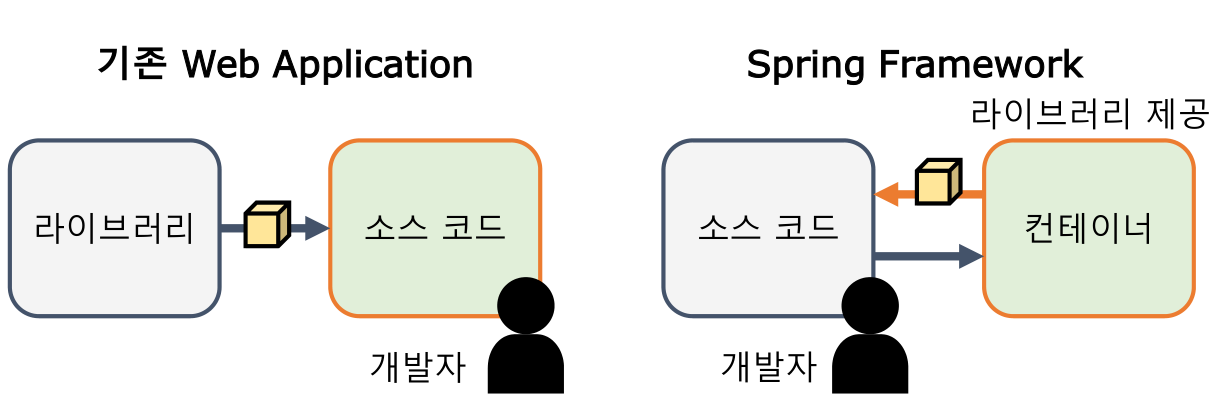


section03


 Application

import java.util.HashMap;
import java.util.Map;
import java.util.Scanner;

public class Application {

	public static void main(String[] args) {
		
		Scanner sc = new Scanner(System.in);
		MenuController menuController = new MenuController();
		
		do {
			System.out.println("========== 메뉴 관리 ==========");
			System.out.println("1. 메뉴 전체 조회");
			System.out.println("2. 메뉴 코드로 메뉴 조회");
			System.out.println("3. 신규 메뉴 추가");
			System.out.println("4. 메뉴 수정");
			System.out.println("5. 메뉴 삭제");
			System.out.print("메뉴 관리 번호를 입력하세요 : ");
			int no = sc.nextInt();
			
			switch(no) {
			case 1 : menuController.selectAllMenu(); break;
			case 2 : menuController.selectMenuByCode(inputMenuCode()); break;
			case 3 : menuController.registMenu(inputMenu()); break;
			case 4 : menuController.modifyMenu(inputModifyMenu());break;
			case 5 : menuController.deleteMenu(inputMenuCode()); break;
			default : System.out.println("잘못 된 메뉴를 선택하셨습니다.");
			}
		} while(true);
		
		
	}
	
	private static Map<String, String> inputMenuCode() {
		
		Scanner sc = new Scanner(System.in);
		System.out.print("메뉴 코드를 입력하세요 : ");
		String code = sc.nextLine();
		
		Map<String, String> parameter = new HashMap<>();
		parameter.put("code", code);
		
		return parameter;
		
	}
	
	private static Map<String, String> inputMenu() {
		
		Scanner sc = new Scanner(System.in);
		System.out.print("메뉴 이름을 입력하세요 : ");
		String name = sc.nextLine();
		System.out.print("메뉴 가격을 입력하세요 : ");
		String price = sc.nextLine();
		System.out.print("카테고리 코드를 입력하세요 : ");
		String categoryCode = sc.nextLine();
		
		Map<String, String> parameter = new HashMap<>();
		parameter.put("name", name);
		parameter.put("price", price);
		parameter.put("categoryCode", categoryCode);
		
		return parameter;
		
	}
	
	private static Map<String, String> inputModifyMenu() {
		
		Scanner sc = new Scanner(System.in);
		System.out.print("수정할 메뉴 코드를 입력하세요 : ");
		String code = sc.nextLine();
		System.out.print("수정할 메뉴 이름을 입력하세요 : ");
		String name = sc.nextLine();
		System.out.print("수정할 메뉴 가격을 입력하세요 : ");
		String price = sc.nextLine();
		System.out.print("수정할 카테고리 코드를 입력하세요 : ");
		String categoryCode = sc.nextLine();
		
		Map<String, String> parameter = new HashMap<>();
		parameter.put("code", code);
		parameter.put("name", name);
		parameter.put("price", price);
		parameter.put("categoryCode", categoryCode);
		
		return parameter;
		
	}


}


MenuController


import java.util.List;
import java.util.Map;

public class MenuController {

	private final PrintResult printResult;
	private final MenuService menuService;
	
	public MenuController() {
		printResult = new PrintResult();
		menuService = new MenuService();
	}
	
	public void selectAllMenu() {
		
		List<MenuDTO> menuList = menuService.selectAllMenu();
		
		if(menuList != null) {
			printResult.printMenuList(menuList);
		} else {
			printResult.printErrorMessage("selectList");
		}
		
	}

	public void selectMenuByCode(Map<String, String> parameter) {
		
		int code = Integer.parseInt(parameter.get("code"));
		
		MenuDTO menu = menuService.selectMenuByCode(code);
		
		if(menu != null) {
			printResult.printMenu(menu);
		} else {
			printResult.printErrorMessage("selectOne");
		}
		
	}

	public void registMenu(Map<String, String> parameter) {
		
		String name = parameter.get("name");
		int price = Integer.parseInt(parameter.get("price"));
		int categoryCode = Integer.parseInt(parameter.get("categoryCode"));
		
		MenuDTO menu = new MenuDTO();
		menu.setName(name);
		menu.setPrice(price);
		menu.setCategoryCode(categoryCode);
		
		if(menuService.registMenu(menu)) {
			printResult.printSuccessMessage("insert");
		} else {
			printResult.printErrorMessage("insert");
		}
	}

	public void modifyMenu(Map<String, String> parameter) {
		
		int code = Integer.parseInt(parameter.get("code"));
		String name = parameter.get("name");
		int price = Integer.parseInt(parameter.get("price"));
		int categoryCode = Integer.parseInt(parameter.get("categoryCode"));
		
		MenuDTO menu = new MenuDTO();
		menu.setCode(code);
		menu.setName(name);
		menu.setPrice(price);
		menu.setCategoryCode(categoryCode);
		
		if(menuService.modifyMenu(menu)) {
			printResult.printSuccessMessage("update");
		} else {
			printResult.printErrorMessage("update");
		}
		
	}

	public void deleteMenu(Map<String, String> parameter) {
		
		int code = Integer.parseInt(parameter.get("code"));
		
		if(menuService.deleteMenu(code)) {
			printResult.printSuccessMessage("delete");
		} else {
			printResult.printErrorMessage("delete");
		}
		
	}


}


MenuDTO


public class MenuDTO {
	
	private int code;
	private String name;
	private int price;
	private int categoryCode;
	private String orderableStatus;
	
	public MenuDTO() {}

	public MenuDTO(int code, String name, int price, int categoryCode,
    String orderableStatus) {
		super();
		this.code = code;
		this.name = name;
		this.price = price;
		this.categoryCode = categoryCode;
		this.orderableStatus = orderableStatus;
	}

	public int getCode() {
		return code;
	}

	public void setCode(int code) {
		this.code = code;
	}

	public String getName() {
		return name;
	}

	public void setName(String name) {
		this.name = name;
	}

	public int getPrice() {
		return price;
	}

	public void setPrice(int price) {
		this.price = price;
	}

	public int getCategoryCode() {
		return categoryCode;
	}

	public void setCategoryCode(int categoryCode) {
		this.categoryCode = categoryCode;
	}

	public String getOrderableStatus() {
		return orderableStatus;
	}

	public void setOrderableStatus(String orderableStatus) {
		this.orderableStatus = orderableStatus;
	}

	@Override
	public String toString() {
		return "MenuDTO [code=" + code + ", name=" + name + ", 
        price=" + price + ", categoryCode=" + categoryCode
				+ ", orderableStatus=" + orderableStatus + "]";
	}


}


MenuMapper

import java.util.List;

import org.apache.ibatis.annotations.Delete;
import org.apache.ibatis.annotations.Insert;
import org.apache.ibatis.annotations.Result;
import org.apache.ibatis.annotations.ResultMap;
import org.apache.ibatis.annotations.Results;
import org.apache.ibatis.annotations.Select;
import org.apache.ibatis.annotations.Update;

public interface MenuMapper {

	List<MenuDTO> selectAllMenu();

	MenuDTO selectMenuByCode(int code);

	int insertMenu(MenuDTO menu);
	
	int updateMenu(MenuDTO menu);

	int deleteMenu(int code);

}


MenuService


import java.util.List;
import static com.greedy.section03.remix.Template.getSqlSession;
import org.apache.ibatis.session.SqlSession;

public class MenuService {
	
	private MenuMapper menuMapper;
	
	public List<MenuDTO> selectAllMenu() {
		
		SqlSession sqlSession = getSqlSession();
		
		/* sqlSession은 요청 단위 생성이다.
        따라서 getMapper로 메소드 스코프로 매번 불러와야 한다. */
		menuMapper = sqlSession.getMapper(MenuMapper.class);
		List<MenuDTO> menuList = menuMapper.selectAllMenu();
		
		sqlSession.close();
		
		return menuList;
	}
	

	public MenuDTO selectMenuByCode(int code) {
		
		SqlSession sqlSession = getSqlSession();
		
		menuMapper = sqlSession.getMapper(MenuMapper.class);
		MenuDTO menu = menuMapper.selectMenuByCode(code);
		
		sqlSession.close();
		
		return menu;
	}

	public boolean registMenu(MenuDTO menu) {
		
		SqlSession sqlSession = getSqlSession();
		
		menuMapper = sqlSession.getMapper(MenuMapper.class);
		int result = menuMapper.insertMenu(menu);
		
		if(result > 0) {
			sqlSession.commit();
		} else {
			sqlSession.rollback();
		}
		
		sqlSession.close();
		
		return result > 0 ? true : false;
	}

	public boolean modifyMenu(MenuDTO menu) {
		
		SqlSession sqlSession = getSqlSession();
		
		menuMapper = sqlSession.getMapper(MenuMapper.class);
		int result = menuMapper.updateMenu(menu);
		
		if(result > 0) {
			sqlSession.commit();
		} else {
			sqlSession.rollback();
		}
		
		sqlSession.close();
		
		return result > 0 ? true : false;
		
	}

	public boolean deleteMenu(int code) {
		
		SqlSession sqlSession = getSqlSession();
		
		menuMapper = sqlSession.getMapper(MenuMapper.class);
		int result = menuMapper.deleteMenu(code);
		
		if(result > 0) {
			sqlSession.commit();
		} else {
			sqlSession.rollback();
		}
		
		sqlSession.close();
		
		return result > 0 ? true : false;
		
	}
}


PrintResult

import java.util.List;

public class PrintResult {

	public void printMenuList(List<MenuDTO> menuList) {
		for(MenuDTO menu : menuList) {
			System.out.println(menu);
		}
	}
	
	public void printMenu(MenuDTO menu) {
		System.out.println(menu);
	}

	public void printSuccessMessage(String successCode) {
		String successMessage = "";
		switch(successCode) {
		case "insert" : successMessage = "신규 메뉴 등록에 성공하셨습니다."; break;
		case "update" : successMessage = "메뉴 수정에 성공하셨습니다."; break;
		case "delete" : successMessage = "메뉴 삭제에 성공하셨습니다."; break;
		}
		System.out.println(successMessage);
	}

	public void printErrorMessage(String errorCode) {
		String errorMessage = "";
		switch(errorCode) {
		case "selectList" : errorMessage = "메뉴 목록 조회에 실패하셨습니다."; break;
		case "selectOne" : errorMessage = "메뉴 조회에 실패하셨습니다."; break;
		case "insert" : errorMessage = "신규 메뉴 등록에 실패하셨습니다."; break;
		case "update" : errorMessage = "메뉴 수정에 실패하셨습니다."; break;
		case "delete" : errorMessage = "메뉴 삭제에 실패하셨습니다."; break;
		}
		
		System.out.println(errorMessage);
	}


}


Template

import org.apache.ibatis.datasource.pooled.PooledDataSource;
import org.apache.ibatis.mapping.Environment;
import org.apache.ibatis.session.Configuration;
import org.apache.ibatis.session.SqlSession;
import org.apache.ibatis.session.SqlSessionFactory;
import org.apache.ibatis.session.SqlSessionFactoryBuilder;
import org.apache.ibatis.transaction.jdbc.JdbcTransactionFactory;

public class Template {
	
	private static String DRIVER = "oracle.jdbc.driver.OracleDriver";
	private static String URL = "jdbc:log4jdbc:oracle:thin:@localhost:1521:xe";
	private static String USER = "C##GREEDY";
	private static String PASSWORD = "GREEDY";
	
	private static SqlSessionFactory sqlSessionFactory;
	
	public static SqlSession getSqlSession() {
		
		if(sqlSessionFactory == null) {
			Environment environment =
					new Environment("dev"
			 , new JdbcTransactionFactory()
			 , new PooledDataSource(DRIVER, URL, USER, PASSWORD));
			
			Configuration configuration = new Configuration(environment);
			
			configuration.addMapper(MenuMapper.class);
			
			sqlSessionFactory = new SqlSessionFactoryBuilder().build(configuration);
		}

		return sqlSessionFactory.openSession(false);
		
	}


}
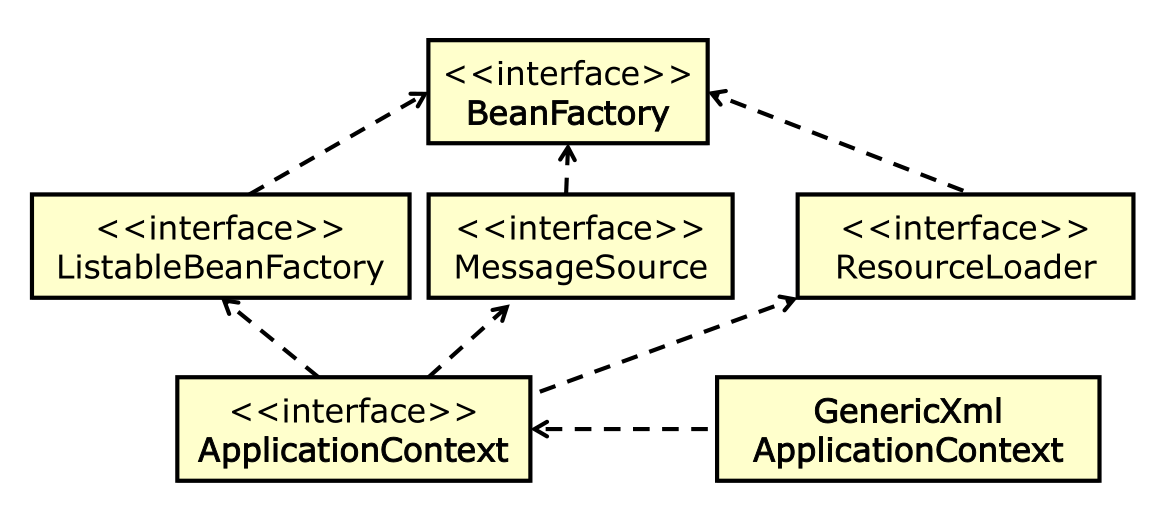


'Programming > Mybatis' 카테고리의 다른 글

Mybatis CURD 실습 (4)  (0) 2022.03.17
Mybatis CURD 실습 (3)  (0) 2022.03.17
3. Mybatis 동적 SQL  (0) 2022.03.15
Mybatis CURD 실습 (1)  (0) 2022.03.14
2. Mybatis (2)  (0) 2022.03.14


Framework


Mybatis 동적 SQL


일반적으로 검색 기능이나 다중 입력 처리 등을 수행해야 할 경우 SQL을 실행하는 Dao를 여러 번 호출하거나 batch 기능을 이용하여 버퍼에 담아서 한번에 실행 시키는 방식으로 쿼리를 구현했다면, 마이바티스에서는 이를 동적으로 제어할 수 있 는 구문을 제공하여 좀 더 쉽게 쿼리를 쉽게 구현할 수 있도록 하는 기능을 지원한다.


지원 구문 종류

  • 1. if
  • 2. choose (when, otherwise)
  • 3. trim (where, set)
  • 4. foreach


if 구문


  • 동적 쿼리를 구현할 때 가장 기본적으로 사용되는 구문
  • 특정 조건을 만족할 경우 안의 구문을 쿼리에 포함시킨다


if구문 예시


다중 if 구문 사용


필요로 하는 조건이 1개 이상일 시 if 구문을 여러 개 사용할 수도 있다


choose, when, otherwise 구문


  • 자바의 if-else, switch, JSLT의 choose 구문과 유사
  • 주어진 구문 중 한 가지 만을 수행하고자 할 때 사용한다.


choose 구문 예시


이런 SQL이 있다면…


결과 1 : if 조건 어느 것도 만족하지 못했을 때


결과 2 : 두 번째 if 조건 만을 만족할 때


trim, where, set 구문


  • <trim>은 쿼리의 구문의 특정 부분을 없앨 때 쓰인다
  • <where>는 기존 쿼리의 WHERE 절을 동적으로 구현할 때 사용한다
  • <set>은 기존의 UPDATE SET 절을 동적으로 구현할 때 사용한다


where 구문으로 변경


<where> 태그는 단순히 WHERE만을 추가하지만, 만약 태그 안의 내용이 'AND' 나 'OR'로 시작할 경우 'AND'나 'OR'를 제거한다.


trim 구문으로 변경


<trim> 태그는 태그 안의 내용 완성될 때 처음 시작할 단어와 시작 시 제거해야 할 단어를 명시하여 where와 같은 내용으로 구현할 수 있다.


set 구문 사용 예시


<set> 태그는 입력 받은 값을 고정으로 모두 변경하는 것이 아니라 주어진 값에 대해서만 변경할 수 있는 UPDATE 동적 SQL 구현을 돕는다


trim 구문으로 변경


where와 흡사하나 surffixOverrides 속성을 ',' 로 설정하여 구문의 마지막에 제거할 값을 명시한다.


foreach 구문


동적 쿼리를 구현할 때 collection에 대한 반복 처리를 제공한다


foreach 태그의 속성


foreach 구문 예시


결과 SQL 생성


bind 구문


  • 특정 문장을 미리 생성하여 쿼리에 적용해야 할 경우 사용
  •  ' _parameter ' 를 통해 전달받은 값에 접근하여 구문을 생성한다


bind 구문 예시


'Programming > Mybatis' 카테고리의 다른 글

Mybatis CURD 실습 (3)  (0) 2022.03.17
Mybatis CURD 실습 (2)  (0) 2022.03.15
Mybatis CURD 실습 (1)  (0) 2022.03.14
2. Mybatis (2)  (0) 2022.03.14
2. Mybatis (1)  (0) 2022.03.14


▼ 코드로 예시 확인 ▼


환경 설정 


  • 라이브러리 폴더에 다운받은 파일을 붙여놓기 한다. 


Mybatis.zip
5.77MB


  • 붙여 넣기 한 모습 


  • 프로젝트 우클릭 > properties 클릭 > Libraries 탭 클릭 > Classpath 선택 > Add JARs... > 해당 프로젝트 lib 파일내 미리 붙여넣은 파일 선택 


manu-mapper.xml

<?xml version="1.0" encoding="UTF-8"?>
<!DOCTYPE mapper
  PUBLIC "-//mybatis.org//DTD Mapper 3.0//EN"
  "http://mybatis.org/dtd/mybatis-3-mapper.dtd">
<mapper namespace="MenuMapper">
	
	<!-- 조회한 컬럼과 DTO를 매핑 시키기 위한 설정이다. -->
	<resultMap type="com.greedy.section01.xmlconfig.MenuDTO" id="menuResultMap">
		<id property="code" column="MENU_CODE"/>
		<result property="name" column="MENU_NAME"/>
		<result property="price" column="MENU_PRICE"/>
		<result property="categoryCode" column="CATEGORY_CODE"/>
		<result property="orderableStatus" column="ORDERABLE_STATUS"/>
	</resultMap>
	
	<select id="selectAllMenu" resultMap="menuResultMap">
		SELECT
		       MENU_CODE
		     , MENU_NAME
		     , MENU_PRICE
		     , CATEGORY_CODE
		     , ORDERABLE_STATUS
		  FROM TBL_MENU
		 WHERE ORDERABLE_STATUS = 'Y'
	     ORDER BY MENU_CODE
	</select>
	
	<!-- 
	파라미터가 한 개인 경우 바인딩 되는 이름은 상관 없다. 파라미터
    타입도 지정하지 않아도 된다.
	resultMap : 위에서 정의한 resultMap을 리턴 타입으로 이용하는 경우
	resultType : 이미 정의 되어 있는 타입을 리턴 타입으로 이용하는 경우 
	 -->
	<select id="selectMenuByCode" parameterType="_int" resultMap="menuResultMap">
		SELECT
		       MENU_CODE
		     , MENU_NAME
		     , MENU_PRICE
		     , CATEGORY_CODE
		     , ORDERABLE_STATUS
		  FROM TBL_MENU
		 WHERE ORDERABLE_STATUS = 'Y'
	       AND MENU_CODE = #{ code }
	</select>
	
	<!-- insert, update, delete의 경우 resultType은 작성하지 않는다. 
    기본 _int로 수행 결과를 리턴한다. -->
	<!-- 파라미터로 전달 된 DTO의 필드 이름으로 값을 바인딩 해주어야 한다. 
    getter를 이용하며 getter가 없는 경우 에러가 발생한다. -->
	<!-- 파라미터 타입도 생략이 가능하다. -->
	<insert id="insertMenu" parameterType="com.greedy.section01.xmlconfig.MenuDTO">
		INSERT
		  INTO TBL_MENU
		(
		  MENU_CODE
		, MENU_NAME
		, MENU_PRICE
		, CATEGORY_CODE
		, ORDERABLE_STATUS 
		)
		VALUES
		(
		  SEQ_MENU_CODE.NEXTVAL
		, #{ name }
		, #{ price }
		, #{ categoryCode }
		, 'Y'
		)
	</insert>
	
	<update id="updateMenu" parameterType="com.greedy.section01.xmlconfig.MenuDTO">
		UPDATE
		       TBL_MENU
		   SET MENU_NAME = #{ name }
		     , MENU_PRICE = #{ price }
		     , CATEGORY_CODE = #{ categoryCode }
		 WHERE MENU_CODE = #{ code }
	</update>
	
	<delete id="deleteMenu" parameterType="_int">
        DELETE
          FROM TBL_MENU 
         WHERE MENU_CODE = #{ code }
	</delete>
	
	
</mapper>


mybatis-config.xml

<?xml version="1.0" encoding="UTF-8"?>
<!DOCTYPE configuration
  PUBLIC "-//mybatis.org//DTD Config 3.0//EN"
  "http://mybatis.org/dtd/mybatis-3-config.dtd">
<configuration>
	<environments default="dev">
		<environment id="dev">
			<!-- JDBC와 MANAGED 둘 중 하나 선택 가능 -->
			<transactionManager type="JDBC"/>
			<!-- POOLED와 UNPOOLED 선택 가능 -->
			<dataSource type="POOLED">
				<property name="driver" value="oracle.jdbc.driver.OracleDriver"/>
				<property name="url" 
                value="jdbc:log4jdbc:oracle:thin:@localhost:1521:xe"/>
				<property name="username" value="C##GREEDY"/>
				<property name="password" value="GREEDY"/>
			</dataSource>
		</environment>
	</environments>
	<mappers>
		<mapper resource="com/greedy/section01/xmlconfig/menu-mapper.xml"/>
	</mappers>
</configuration>


Application

package com.greedy.section01.xmlconfig;

import java.util.HashMap;
import java.util.Map;
import java.util.Scanner;

public class Application {

	public static void main(String[] args) {
		
		Scanner sc = new Scanner(System.in);
		MenuController menuController = new MenuController();
		
		do {
			System.out.println("========== 메뉴 관리 ==========");
			System.out.println("1. 메뉴 전체 조회");
			System.out.println("2. 메뉴 코드로 메뉴 조회");
			System.out.println("3. 신규 메뉴 추가");
			System.out.println("4. 메뉴 수정");
			System.out.println("5. 메뉴 삭제");
			System.out.print("메뉴 관리 번호를 입력하세요 : ");
			int no = sc.nextInt();
			
			switch(no) {
			case 1 : menuController.selectAllMenu(); break;
			case 2 : menuController.selectMenuByCode(inputMenuCode()); break;
			case 3 : menuController.registMenu(inputMenu()); break;
			case 4 : menuController.modifyMenu(inputModifyMenu());break;
			case 5 : menuController.deleteMenu(inputMenuCode()); break;
			default : System.out.println("잘못 된 메뉴를 선택하셨습니다.");
			}
		} while(true);
		
		
	}
	
	private static Map<String, String> inputMenuCode() {
		
		Scanner sc = new Scanner(System.in);
		System.out.print("메뉴 코드를 입력하세요 : ");
		String code = sc.nextLine();
		
		Map<String, String> parameter = new HashMap<>();
		parameter.put("code", code);
		
		return parameter;
		
	}
	
	private static Map<String, String> inputMenu() {
		
		Scanner sc = new Scanner(System.in);
		System.out.print("메뉴 이름을 입력하세요 : ");
		String name = sc.nextLine();
		System.out.print("메뉴 가격을 입력하세요 : ");
		String price = sc.nextLine();
		System.out.print("카테고리 코드를 입력하세요 : ");
		String categoryCode = sc.nextLine();
		
		Map<String, String> parameter = new HashMap<>();
		parameter.put("name", name);
		parameter.put("price", price);
		parameter.put("categoryCode", categoryCode);
		
		return parameter;
		
	}
	
	private static Map<String, String> inputModifyMenu() {
		
		Scanner sc = new Scanner(System.in);
		System.out.print("수정할 메뉴 코드를 입력하세요 : ");
		String code = sc.nextLine();
		System.out.print("수정할 메뉴 이름을 입력하세요 : ");
		String name = sc.nextLine();
		System.out.print("수정할 메뉴 가격을 입력하세요 : ");
		String price = sc.nextLine();
		System.out.print("수정할 카테고리 코드를 입력하세요 : ");
		String categoryCode = sc.nextLine();
		
		Map<String, String> parameter = new HashMap<>();
		parameter.put("code", code);
		parameter.put("name", name);
		parameter.put("price", price);
		parameter.put("categoryCode", categoryCode);
		
		return parameter;
		
	}


}


MenuController

import java.util.List;
import java.util.Map;

public class MenuController {

	private final PrintResult printResult;
	private final MenuService menuService;
	
	public MenuController() {
		printResult = new PrintResult();
		menuService = new MenuService();
	}
	
	public void selectAllMenu() {
		
		List<MenuDTO> menuList = menuService.selectAllMenu();
		
		if(menuList != null) {
			printResult.printMenuList(menuList);
		} else {
			printResult.printErrorMessage("selectList");
		}
		
	}

	public void selectMenuByCode(Map<String, String> parameter) {
		
		int code = Integer.parseInt(parameter.get("code"));
		
		MenuDTO menu = menuService.selectMenuByCode(code);
		
		if(menu != null) {
			printResult.printMenu(menu);
		} else {
			printResult.printErrorMessage("selectOne");
		}
		
	}

	public void registMenu(Map<String, String> parameter) {
		
		String name = parameter.get("name");
		int price = Integer.parseInt(parameter.get("price"));
		int categoryCode = Integer.parseInt(parameter.get("categoryCode"));
		
		MenuDTO menu = new MenuDTO();
		menu.setName(name);
		menu.setPrice(price);
		menu.setCategoryCode(categoryCode);
		
		if(menuService.registMenu(menu)) {
			printResult.printSuccessMessage("insert");
		} else {
			printResult.printErrorMessage("insert");
		}
	}

	public void modifyMenu(Map<String, String> parameter) {
		
		int code = Integer.parseInt(parameter.get("code"));
		String name = parameter.get("name");
		int price = Integer.parseInt(parameter.get("price"));
		int categoryCode = Integer.parseInt(parameter.get("categoryCode"));
		
		MenuDTO menu = new MenuDTO();
		menu.setCode(code);
		menu.setName(name);
		menu.setPrice(price);
		menu.setCategoryCode(categoryCode);
		
		if(menuService.modifyMenu(menu)) {
			printResult.printSuccessMessage("update");
		} else {
			printResult.printErrorMessage("update");
		}
		
	}

	public void deleteMenu(Map<String, String> parameter) {
		
		int code = Integer.parseInt(parameter.get("code"));
		
		if(menuService.deleteMenu(code)) {
			printResult.printSuccessMessage("delete");
		} else {
			printResult.printErrorMessage("delete");
		}
		
	}


}


class MenuDAO

import java.util.List;

import org.apache.ibatis.session.SqlSession;

public class MenuDAO {

	public List<MenuDTO> selectAllMenu(SqlSession sqlSession) {
		return sqlSession.selectList("MenuMapper.selectAllMenu");
	}

	public MenuDTO selectMenuByCode(SqlSession sqlSession, int code) {
		return sqlSession.selectOne("MenuMapper.selectMenuByCode", code);
	}

	public int insertMenu(SqlSession sqlSession, MenuDTO menu) {
		return sqlSession.insert("MenuMapper.insertMenu", menu);
	}

	public int updateMenu(SqlSession sqlSession, MenuDTO menu) {
		return sqlSession.update("MenuMapper.updateMenu", menu);
	}

	public int deleteMenu(SqlSession sqlSession, int code) {
		return sqlSession.delete("MenuMapper.deleteMenu", code);
	}

}


MenuDTO


public class MenuDTO {
	
	private int code;
	private String name;
	private int price;
	private int categoryCode;
	private String orderableStatus;
	
	public MenuDTO() {}

	public MenuDTO(int code, String name, int price, int categoryCode, String orderableStatus) {
		super();
		this.code = code;
		this.name = name;
		this.price = price;
		this.categoryCode = categoryCode;
		this.orderableStatus = orderableStatus;
	}

	public int getCode() {
		return code;
	}

	public void setCode(int code) {
		this.code = code;
	}

	public String getName() {
		return name;
	}

	public void setName(String name) {
		this.name = name;
	}

	public int getPrice() {
		return price;
	}

	public void setPrice(int price) {
		this.price = price;
	}

	public int getCategoryCode() {
		return categoryCode;
	}

	public void setCategoryCode(int categoryCode) {
		this.categoryCode = categoryCode;
	}

	public String getOrderableStatus() {
		return orderableStatus;
	}

	public void setOrderableStatus(String orderableStatus) {
		this.orderableStatus = orderableStatus;
	}

	@Override
	public String toString() {
		return "MenuDTO [code=" + code + ", name=" + name + ",
        price=" + price + ", categoryCode=" + categoryCode
				+ ", orderableStatus=" + orderableStatus + "]";
	}


}


MenuService


import java.util.List;
import static com.greedy.section01.xmlconfig.Template.getSqlSession;
import org.apache.ibatis.session.SqlSession;

public class MenuService {
	
	private final MenuDAO menuDAO;
	
	public MenuService() {
		menuDAO = new MenuDAO();
	}

	public List<MenuDTO> selectAllMenu() {
		
		SqlSession sqlSession = getSqlSession();
		
		List<MenuDTO> menuList = menuDAO.selectAllMenu(sqlSession);
		
		sqlSession.close();
		
		return menuList;
	}

	public MenuDTO selectMenuByCode(int code) {
		
		SqlSession sqlSession = getSqlSession();
		
		MenuDTO menu = menuDAO.selectMenuByCode(sqlSession, code);
		
		sqlSession.close();
		
		return menu;
	}

	public boolean registMenu(MenuDTO menu) {
		
		SqlSession sqlSession = getSqlSession();
		
		int result = menuDAO.insertMenu(sqlSession, menu);
		
		if(result > 0) {
			sqlSession.commit();
		} else {
			sqlSession.rollback();
		}
		
		sqlSession.close();
		
		return result > 0 ? true : false;
	}

	public boolean modifyMenu(MenuDTO menu) {
		
		SqlSession sqlSession = getSqlSession();
		
		int result = menuDAO.updateMenu(sqlSession, menu);
		
		if(result > 0) {
			sqlSession.commit();
		} else {
			sqlSession.rollback();
		}
		
		sqlSession.close();
		
		return result > 0 ? true : false;
	}

	public boolean deleteMenu(int code) {
		
		SqlSession sqlSession = getSqlSession();
		
		int result = menuDAO.deleteMenu(sqlSession, code);
		
		if(result > 0) {
			sqlSession.commit();
		} else {
			sqlSession.rollback();
		}
		
		sqlSession.close();
		
		return result > 0? true: false;
		
	}


}


PrintResult

import java.util.List;

public class PrintResult {

	public void printMenuList(List<MenuDTO> menuList) {
		for(MenuDTO menu : menuList) {
			System.out.println(menu);
		}
	}
	
	public void printMenu(MenuDTO menu) {
		System.out.println(menu);
	}

	public void printSuccessMessage(String successCode) {
		String successMessage = "";
		switch(successCode) {
		case "insert" : successMessage = "신규 메뉴 등록에 성공하셨습니다."; break;
		case "update" : successMessage = "메뉴 수정에 성공하셨습니다."; break;
		case "delete" : successMessage = "메뉴 삭제에 성공하셨습니다."; break;
		}
		System.out.println(successMessage);
	}

	public void printErrorMessage(String errorCode) {
		String errorMessage = "";
		switch(errorCode) {
		case "selectList" : errorMessage = "메뉴 목록 조회에 실패하셨습니다."; break;
		case "selectOne" : errorMessage = "메뉴 조회에 실패하셨습니다."; break;
		case "insert" : errorMessage = "신규 메뉴 등록에 실패하셨습니다."; break;
		case "update" : errorMessage = "메뉴 수정에 실패하셨습니다."; break;
		case "delete" : errorMessage = "메뉴 삭제에 실패하셨습니다."; break;
		}
		
		System.out.println(errorMessage);
	}


}


Template


import java.io.IOException;
import java.io.InputStream;

import org.apache.ibatis.io.Resources;
import org.apache.ibatis.session.SqlSession;
import org.apache.ibatis.session.SqlSessionFactory;
import org.apache.ibatis.session.SqlSessionFactoryBuilder;

public class Template {
	
	private static SqlSessionFactory sqlSessionFactory;
	
	public static SqlSession getSqlSession() {
		
		if(sqlSessionFactory == null) {
			String resource = "com/greedy/section01/xmlconfig/mybatis-config.xml";
			try {
				InputStream inputStream = Resources.getResourceAsStream(resource);
				sqlSessionFactory
                = new SqlSessionFactoryBuilder().build(inputStream);			
			} catch (IOException e) {
				e.printStackTrace();
			}
		}

		return sqlSessionFactory.openSession(false);
		
	}

}
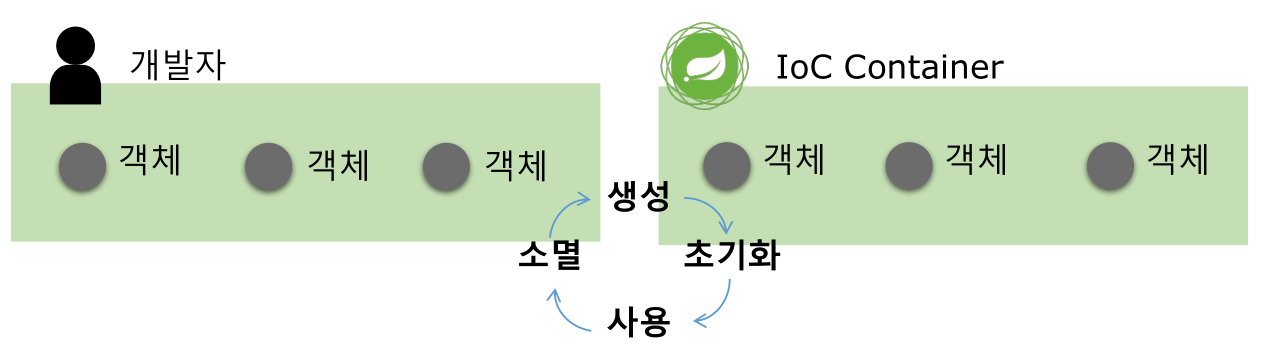


'Programming > Mybatis' 카테고리의 다른 글

Mybatis CURD 실습 (2)  (0) 2022.03.15
3. Mybatis 동적 SQL  (0) 2022.03.15
2. Mybatis (2)  (0) 2022.03.14
2. Mybatis (1)  (0) 2022.03.14
1. Framework  (0) 2022.03.14


mapper 설정하기


mapper.xml 생성 위치


쿼리 실행이 필요한 model의 위치에 mapper 폴더를 생성하고 식별하기 쉬운 이름을 지어 mapper.xml 파일을 등록한다.


    <?xml version="1.0" encoding="utf-8"?>
    <!DOCTYPE mapper PUBLIC
    "-//mybatis.org//DTD Mapper 3.0//EN"
    "http://mybatis.org/dtd/mybatis-3-mapper.dtd">
    <mapper namespace="mybatis_sample01.CityInfo">

    <resultMap id="cityInfoResult" type="CityInfo">
    <id property="name" column="Name" />
    <result property="code" column="CountryCode" />
    </resultMap>

    <select id="selectInfo" parameterType="int"
    resultType="CityInfo" resultMap="cityInfoResult">
    SELECT * FROM WORLD.CITY WHERE ID = #{ID}
    </select>

    </mapper>


mapper.xml 작성


mapper.xml은 사용하고자 하는 쿼리나 결과로 받을 객체를 선언할 수 있다 .


mapper.xml 예시

    <?xml version="1.0" encoding="utf-8"?>
    <!DOCTYPE mapper PUBLIC"-//mybatis.org//DTD Mapper 3.0//EN"
    "http://mybatis.org/dtd/mybatis-3-mapper.dtd">
    <mapper namespace="Member">

    <resultMap id="resultMember" type="Member">
    <id property="id" column="ID" />
    <result property="passwd" column="PASSWD" />
    </resultMap>

    <select id="memberInfo" parameterType="string"
    resultType="_int" resultMap="resultMember">
    SELECT * FROM MEMBER WHERE ID = #{userid}
    </select>

    </mapper>


mapper.xml 작성


먼저 xml 파일 최상단에 다음과 같이 xml 형식을 지정하여 이하의 설정내용은 mybatis mapper 설정임을 선언한다.


    <?xml version="1.0" encoding="utf-8"?>
    <!DOCTYPE mapper PUBLIC
    "-//mybatis.org//DTD Mapper 3.0//EN"
    "http://mybatis.org/dtd/mybatis-3-mapper.dtd">


이어서 <mapper> 태그를 작성하고, 외부에서 접근할 수 있는 이름인 namespace 속성을 기입한다. 이제 이 후 작성될 태그들은 <mapper> 태그 안에 기록하면 된다.

    <mapper namespace="Member">
    . . .
    </mapper>


<resultMap> 태그


조회한 결과를 객체와 Row간의 1:1 매칭이 아닌, 원하는 객체의 필드에 담아 반환하고자 할 때 사용한다.


<resultMap> 태그 예시

<resultMap id="resultMember" type="Member">
<!-- prop 는 필드명, column 은 DB 컬럼 명 -->
<id property="id" column="ID" />
<result property="passwd" column="PASSWD" />
. . .
</resultMap>
  • ※ resultMap의 type 속성은 실제로 구현해 놓은 자바 POJO 객체를 사용해야 하며, Mybatis-config.xml에서 typeAlias를 지정하지 않은 경우, 패키지 명부터 클래스 명까지 모두 기술해야 한다.


<select> 태그


  • SQL의 조회 구문을 작성할 때 쓰인다.
  • 해당 쿼리를 외부에서 접근하고자 할 때 namespace.ID명을 적어 접근이 가능하다.


<select> 태그 예시

    <select id="memberInfo"
    parameterType="string“ resultType="_int">

    SELECT * FROM MEMBER WHERE ID = #{userid}

    <!-- #{field}는 pstmt의 ?의 역할이며, 전달된 값을 뜻한다.
    또한 쿼리의 마지막을 알리는 세미콜론을 찍지 않는다 -->

    </select>


mapper.xml 작성 : <select> 태그 주요 속성


mapper 설정하기 - 참고


FlushCache? useCache?

  • 일반적으로 쿼리를 수행할 때, 쿼리의 결과나 호출되는 내용이 변동이 없는 정적인 쿼리나 결과라면, 이를 매 반복시마다 굳이 새로운 쿼리로 생성하여 호출하거나, 새로운 결과를 받아 올 필요가 없을 것이다.
  • 이러한 상황을 위해 Mybatis에서는 Cache 라는 저장소를 내장하여, 반복되는 정적인 쿼리의 호출이나 결과에 대한내용을 한 번 이상 실행할 경우 이를 미리 저 장해두어 재 호출에 소요되는 시간을 절약할 수 있게 도와준다.


mapper.xml 작성


<insert>, <update>, <delete> 태그


해당 태그들은 설정이 동일하다.


<insert> 태그 예시


<insert>, <update>, <delete> 태그 주요 속성


Mybatis 활용하기


Mybatis SqlSessionFactory 생성


Mybatis-config.xml, mapper.xml 파일 생성을 완료했다면, DAO에서 세션 생성을 위한 getSqlSessionFactory() 메소드를 작성한다.


SqlSessionFactoryBuilder 매소드


  • * config.xml은 Resource객체의 getResourceAsStream매소드를 이용 InputStream으로 가져옴


Mybatis SqlSession 생성


DAO 메소드는 SqlSqssionFactory를 사용하여 SqlSession 객체를 생성한다.


Mybatis SqlSession


Mybatis SqlSessionFactory를 통해 세션을 생성하는 openSession() 메소드는 여러가지 형식으로 오버로딩 되어 있는데, 그 중 대표적인 것은 다음과 같다.


SqlSession을 통한 쿼리 실행 예시


생성한 SqlSession 객체의 메소드를 통해 정의한 쿼리에 접근한다.


SqlSession을 통한 mapper 쿼리 실행


mapper.xml에서 선언한 쿼리구문을 SqlSession에서 실행하는 메소드는 총 6가지가 있다.


▼ 코드로 예시 보기 ▼


  • 환경설정 : 두 파일의 라이브러리가 build path 되어있어야 한다. 


mybatis-config

<?xml version="1.0" encoding="UTF-8"?>
<!DOCTYPE configuration
  PUBLIC "-//mybatis.org//DTD Config 3.0//EN"
  "http://mybatis.org/dtd/mybatis-3-config.dtd">
<configuration>
	<environments default="dev">
		<environment id="dev">
			<!-- JDBC와 MANAGED 둘 중 하나 선택 가능 -->
			<transactionManager type="JDBC"/>
			<!-- POOLED와 UNPOOLED 선택 가능 -->
			<dataSource type="POOLED">
				<property name="driver" value="oracle.jdbc.driver.OracleDriver"/>
				<property name="url" value="jdbc:oracle:thin:@localhost:1521:xe"/>
				<property name="username" value="C##GREEDY"/>
				<property name="password" value="GREEDY"/>
			</dataSource>
		</environment>
	</environments>
</configuration>


section01.Application 

import static com.greedy.section01.xmlconfig.Template.getSqlSession;

public class Application {

	public static void main(String[] args) {
		
		System.out.println(getSqlSession());
		System.out.println(getSqlSession());
		System.out.println(getSqlSession());
		System.out.println(getSqlSession());
		System.out.println(getSqlSession());
		
	}

}
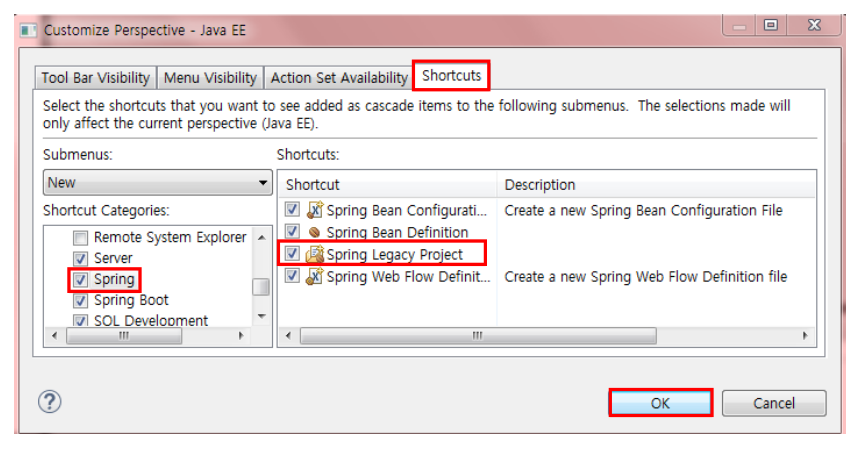
 

Template

import java.io.IOException;
import java.io.InputStream;

import org.apache.ibatis.io.Resources;
import org.apache.ibatis.session.SqlSession;
import org.apache.ibatis.session.SqlSessionFactory;
import org.apache.ibatis.session.SqlSessionFactoryBuilder;

public class Template {
	
	/* SqlSessionFactory는 애플리케이션을 실행하는 동안 존재해야 한다.
	 * 애플리케이션이 실행되는 동안 여러 차례 SqlSessionFactory를 
     다시 빌드하지 않는 것이 가장 좋은 형태이다.
	 * 애플리케이션 스코프로 관리하기 위한 가장 간단한 
     방법은 싱글톤 패턴을 이용하는 것이다.
	 * */
     
	private static SqlSessionFactory sqlSessionFactory;
	
	public static SqlSession getSqlSession() {
		
		
		if(sqlSessionFactory == null) {
			String resource = "com/greedy/section01/xmlconfig/mybatis-config.xml";
			try {
				InputStream inputStream = Resources.getResourceAsStream(resource);
				/* SqlSessionFactoryBuilder는 SqlSessionFactory를
                생성한 후 유지할 필요는 없다.
				 * 따라서 메소드 스코프로 만든다.
				 * */
				sqlSessionFactory
                = new SqlSessionFactoryBuilder().build(inputStream);			
			} catch (IOException e) {
				e.printStackTrace();
			}
		}
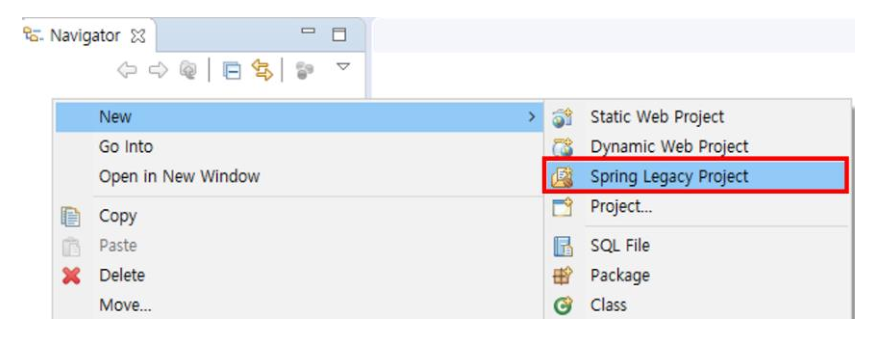
		
		/* SqlSession은 요청 시마다 생성해야 한다.
		 * SqlSession은 쓰레드에 안전하지 않고 공유되지 않아야 한다.
		 * 요청 시 생성하고 요청이 완료되면 close하는 HTTP 요청과
         유사한 스코프에 두는 것이 가장 올바른 방법이다.
		 * */
		SqlSession sqlSession = sqlSessionFactory.openSession(false);
		
		System.out.println("sqlSessionFactory의 hashCode() : " 
        + sqlSessionFactory.hashCode());
		
		return sqlSession;
		
	}

}
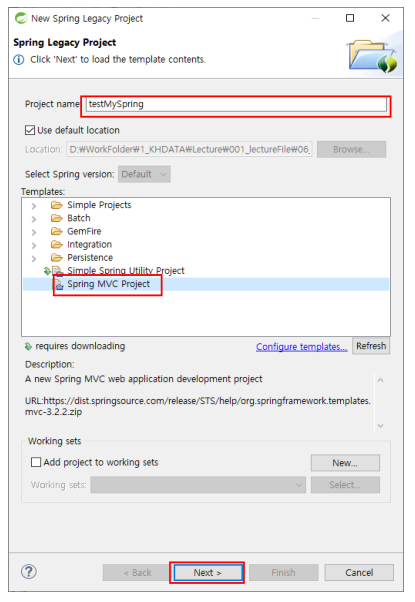


'Programming > Mybatis' 카테고리의 다른 글

Mybatis CURD 실습 (2)  (0) 2022.03.15
3. Mybatis 동적 SQL  (0) 2022.03.15
Mybatis CURD 실습 (1)  (0) 2022.03.14
2. Mybatis (1)  (0) 2022.03.14
1. Framework  (0) 2022.03.14

+ Recent posts